על בסיס סדנת Claude Code דור ב׳ · עמיחי שקל
קלוד קוד בעברית · המדריך המעשי לעסקים
מהמשימה הראשונה ב-Desktop, דרך סקילים וסוכן WhatsApp, ועד אתר באוויר. מסלול מעשי לפי ארבעת מפגשי סדנת קלוד קוד דור ב׳, עם פרומפטים, צילומי מסך ובדיקות בכל שלב.
מאת עמיחי שקל · פורסם · עודכן

מה תלמדו כאן · ארבעה מפגשים, מסלול אחד
יש לכם משימות שהייתם רוצים להעביר הלאה: לסדר חומרי עבודה, למיין פניות, לבנות סוכן לעסק או להעלות אתר. כדי לעבוד עם Claude Code צריך לדעת להגדיר משימה, לתת לו את החומרים הנכונים ולבדוק את מה שהוא בנה.
המדריך מבוסס על ההקלטות והתמלולים של ארבעת מפגשי סדנת Claude Code דור ב׳ של עמיחי שקל: מבוא וסוכנים, התקנות וחיבורים, סוכן אישי ובניית אתרים. עובדים בעיקר באפליקציית Desktop, כפי שנלמד בסדנה. הפרומפטים כאן נוסחו לתרגול עצמי על בסיס ההדגמות; הם אינם ציטוט מילה במילה.
מתחילים בפרויקט קטן, מוסיפים יכולת אחת בכל פעם וממשיכים רק כשהתוצאה עובדת. אפשר לחזור לכל שלב דרך תוכן העניינים.
מפת הדרך · מה יהיה לכם בסוף כל שלב
- מפגש 1 · מבינים מה הסוכן יכול לבצע ומכינים משימה קטנה עם תוצאה שאפשר לבדוק.
- מפגש 2 · פותחים תיקייה ב-Code, בודקים את ההתקנות, מחברים כלי אחד ובונים סקיל למיון מיילים.
- מפגש 3 · מכינים CLAUDE.md, מגדירים סוכן WhatsApp ומחברים מספר, מודל וכלים בהתאם לתפקיד שלו.
- מפגש 4 · בונים אתר לחנות פרחים בשלוש שיטות: אפיון חופשי, השראה מצילום מסך ורכיבים מוכנים. בודקים ומפרסמים.
מפגש 1 · מצ׳אט למשימה שמתבצעת
Claude הוא המודל והמוצר של Anthropic. Claude Desktop היא האפליקציה. בתוך האפליקציה תמצאו ממשקים למשימות שונות: צ׳אט, Cowork ו-Code. בסדנה עוברים בעיקר ל-Code, שבו הסוכן עובד על קבצים ופרויקטים ומריץ כלים לפי ההרשאות שקיבל.
במפגש הראשון הודגמו ארגון קבצים, יצירת תוכן בעזרת כלים חיצוניים, עוזר אישי ואתר הסדנה. המכנה המשותף הוא תהליך: מטרה ברורה, גישה לחומר הרלוונטי, תוכנית, ביצוע ובדיקת תוצאה. יצירת תמונות או וידאו עשויה לדרוש חיבור לשירות נוסף.
לתרגיל הראשון בחרו פעולה שאפשר לבדוק בעיניים. למשל, מיון עותקים של צילומי מסך. אל תתחילו ממערכת שמנהלת את כל העסק: יהיה קשה להבין איזה חלק הצליח ואיזה חלק חסר.
תרגיל ראשון · סדר בקבצים בלי לאבד חומר
בתיקייה הנוכחית יש עותקים של קובצי תרגול. קרא את שמות הקבצים והצע חלוקה לתת-תיקיות לפי סוג ותוכן. הצג תחילה טבלה עם השם הנוכחי והיעד המוצע. אל תמחק, אל תדרוס ואל תעביר דבר לפני שאאשר את התוכנית. לאחר אישור, בצע רק בתיקייה הזאת ושמור דוח שמאפשר לדעת לאן עבר כל קובץ. בסיום השווה את מספר הקבצים לפני ואחרי.הדביקו בכלי המתואר במדריך. מלאו את הפרטים שבסוגריים ובדקו את התוצאה מול המקור.
מפגש 2 · מתקינים סביבת עבודה
בהקלטה הותקנו Git, Node.js ו-Claude Desktop. לכל אחד תפקיד אחר: Git מנהל גרסאות מקומיות, Node.js מריץ פרויקטים וכלים שנבנו עבורו, ו-Desktop הוא ממשק העבודה שלכם. GitHub, שנפגוש בהמשך, הוא שירות נפרד לאחסון ושיתוף מאגרי קוד.
מתקינים Desktop מהאתר של Claude לפי מערכת ההפעלה, פותחים את האפליקציה ומתחברים לחשבון עם גישת Code. במסלול Desktop נדרש מנוי מתאים, כגון Pro או Max. בחשבון ארגוני ייתכן שנדרשת גם הרשאת מנהל.
חשוב להפריד בין הכנת סביבת הסדנה לבין דרישת האפליקציה: Desktop כולל את Claude Code, ואין צורך בהתקנת CLI או Node.js נפרדת רק כדי לפתוח אותו. Node.js נדרש כשפרויקט או כלי מסוים משתמשים בו. ב-Windows בדקו גם את דרישת Git לעבודה מקומית בלשונית Code.
התקנה לפי מערכת ההפעלה
פותחים את התיקייה הראשונה
- צרו במחשב תיקייה בשם claude-workshop-practice. העתיקו אליה כמה קובצי תרגול ומסמך קצר על העסק. שמרו את חומרי המקור בנפרד.
- באפליקציה בחרו Code, התחילו שיחה חדשה ובחרו Local לעבודה על המחשב.
- בחרו את התיקייה דרך Select folder או Open Folder, לפי הגרסה. ודאו שהשם שמופיע מעל שדה ההודעה הוא של הפרויקט שבחרתם.
- בקשו מקלוד לזהות את הקבצים ואת סביבת העבודה. תנו לו לתכנן לפני עריכה. בחירת תיקייה אינה תחליף לבדיקת ההרשאות של הכלים.
- בסיום פתחו את הקובץ שנוצר ובדקו את התוכן. בצ׳אט הבא חזרו לאותה תיקייה כדי להמשיך באותו פרויקט.
בדיקת התקנה · לפני שמתחילים לבנות
בדוק את סביבת העבודה בתיקייה הנוכחית. הצג את הנתיב שלה, את גרסת Git ואת גרסת Node.js אם הם מותקנים. אל תתקין מחדש כלי שכבר קיים. הסבר איזה כלי חסר למשימה שלי ולמה הוא דרוש. צור קובץ בדיקה קטן בשם first-result.txt עם המשפט ״סביבת העבודה שלי מוכנה״, והצג את הנתיב לפתיחתו. אל תשנה הגדרות מערכת בלי להסביר מה נדרש.הדביקו בכלי המתואר במדריך. מלאו את הפרטים שבסוגריים ובדקו את התוצאה מול המקור.
Plan והרשאות · מסכימים על התוצאה לפני ביצוע
למשימה חדשה בחרו Plan. קלוד יבדוק את ההקשר ויציע תוכנית לפני שינוי קובצי הפרויקט. קראו מה הוא מתכוון לבנות, איזה מידע חסר ובאיזה כלים ישתמש. אם הכיוון שגוי, בקשו לתקן את התוכנית. אחרי האישור עוברים לביצוע ובודקים את השינויים.
Manual מבקש אישורים לפעולות; Accept edits מאפשר עריכות קבצים בלי אישור לכל עריכה; Auto, כשזמין, בוחן פעולות אוטומטית. Bypass permissions מדלג על בדיקות הרשאה, ולכן אינו נדרש לתרגילי ההתחלה. זמינות המצבים תלויה בגרסה ובהגדרות החשבון.
הוראה כתובה כמו ״אל תמחק קבצים״ חשובה, אבל אינה מנגנון חסימה. התאימו גם את ההרשאות בפועל. לפני שינוי משמעותי שמרו עותק או גרסה, ולפני שליחה, מחיקה או פרסום קראו מה הפעולה עומדת לעשות.
קונקטורים ו-MCP · נותנים גישה לכלי אחד
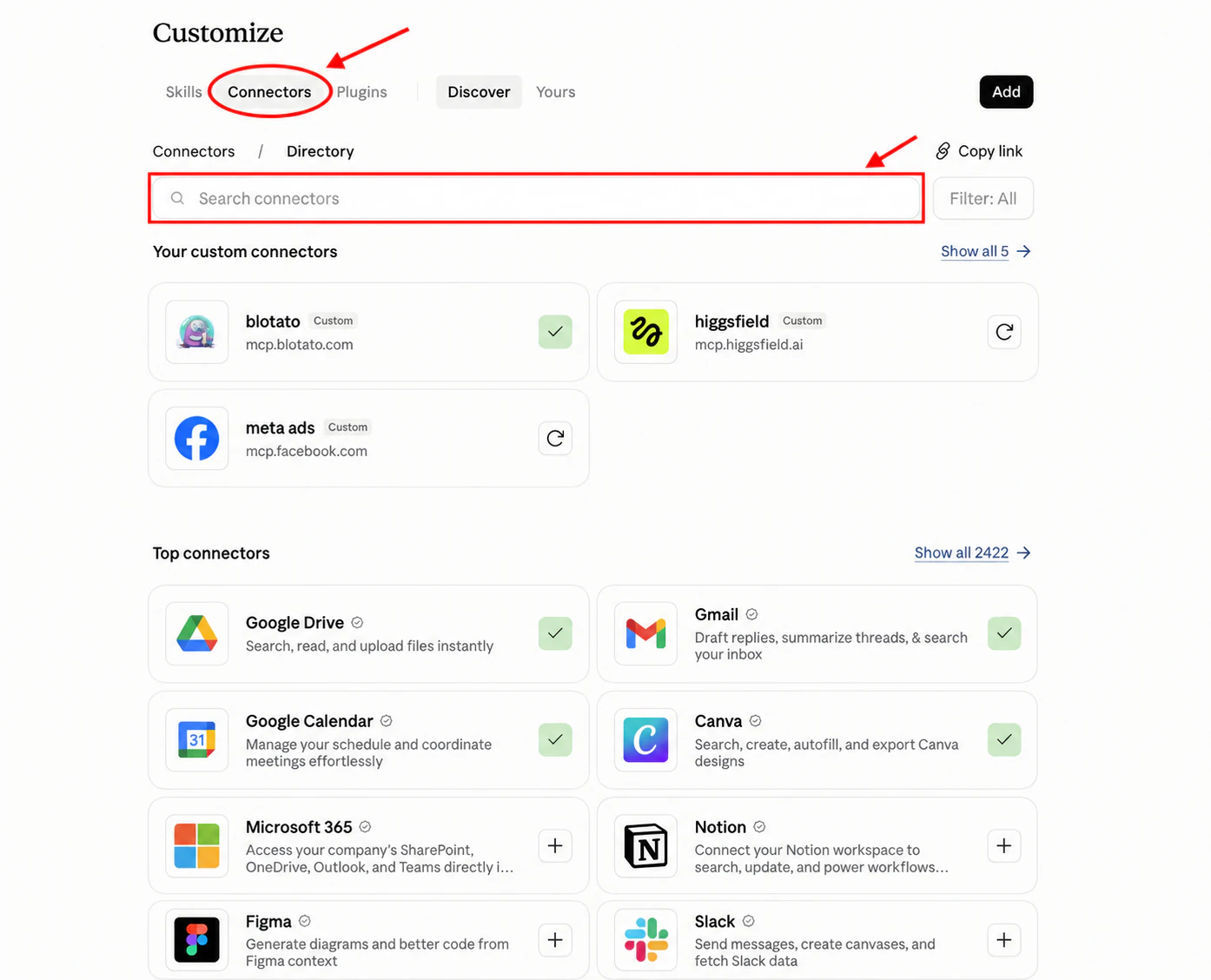
במפגש 2 מחברים את Claude לשירותים כגון Gmail, Google Calendar ו-Google Drive. קונקטור נותן לסוכן יכולת לעבוד עם שירות חיצוני; MCP הוא תקן שבאמצעותו כלים יכולים להיחשף לסוכן. החיבור וההרשאות קובעים אילו פעולות זמינות.
נכנסים ל-Customize, בוחרים Connectors ומחפשים את השירות. בוחרים Connect, מתחברים לחשבון השירות הרצוי וקוראים את ההרשאות. למיון פניות התחלתי מספיק מידע לקריאה; אין צורך לתת הרשאת שליחה כדי לקבל המלצה על תשובה.
בהדגמה הופיעה שגיאת Account Mismatch. בדקו באיזה חשבון הדפדפן מחובר ובאיזה חשבון נמצא השירות, ואז התחברו לחשבון הנכון. אין להסיק שכל השירותים מחייבים כתובת מייל זהה לזו של Claude. אם הכלי אינו בקטלוג, חפשו את הוראות החיבור באתר הספק. כתובת HTTPS של שרת MCP ופקודת התקנה הן שני סוגי קלט שונים.
בודקים חיבור · קריאה לפני פעולה
בדוק אם החיבור ליומן שלי זמין. הצג את שלוש הפגישות הקרובות עם התאריך והשעה ואזור הזמן, בלי ליצור, לשנות או לבטל פגישות ובלי לשלוח הזמנות. אם אין לך גישה או שאין אירועים, אמור זאת במפורש. אל תשלים מידע מהשערה. ציין מאיזה יומן התקבלו התוצאות כדי שאוכל להשוות אותן למקור.הדביקו בכלי המתואר במדריך. מלאו את הפרטים שבסוגריים ובדקו את התוצאה מול המקור.
סקילים · שומרים דרך עבודה שאפשר לחזור אליה
הדוגמה במפגש 2 הייתה Email Triage: סקיל שממיין מיילים ומציע מה לעשות עם כל אחד. סקיל הוא תיקייה עם קובץ SKILL.md, ולעיתים גם קבצי עזר. הוא מתאר מתי להשתמש בו, איך לבצע את המשימה ואיך נראית תוצאה טובה.
קונקטור נותן גישה למייל. הסקיל מגדיר איך למיין אותו. סקיל לבדו אינו יוצר חיבור או הרשאה, ואינו מבטיח תוצאה נכונה. אפשר לבנות סקיל יחד עם קלוד, להתקין ממקור שבדקתם או להשתמש בסקיל קיים.
אחרי ההתקנה תנו משימה מתאימה. אפשר גם לבחור סקיל במפורש באמצעות / ושמו, כשהוא זמין בממשק. אם כמה סקילים מבצעים אותה משימה, ציינו באיזה להשתמש. בדקו את הקובץ ואת מקורו לפני התקנה; מספר הורדות הוא סימן לפופולריות, לא אישור אבטחה.
בונים סקיל · מיון פניות לעסק
בנה איתי סקיל בשם email-triage למיון פניות בעברית. לפני כתיבת הסקיל שאל איך אני מגדיר פנייה דחופה, ליד חדש, לקוח קיים ומידע בלבד. לכל מייל החזר קטגוריה אחת, סיבת המיון, הפעולה המומלצת וטיוטת תשובה כשצריך. אם חסר מידע, סמן ״דורש בדיקה״. אין לשלוח, למחוק, להעביר לארכיון או לשנות תוויות. התחל משלוש דוגמאות שאספק ללא פרטים אישיים. אחרי שאאשר את התוצאות, שמור SKILL.md במקום המתאים והסבר איך להפעיל אותו. בדוק גם פנייה שלא מתאימה בבירור לאף קטגוריה.הדביקו בכלי המתואר במדריך. מלאו את הפרטים שבסוגריים ובדקו את התוצאה מול המקור.
משפרים תהליך שחוזר בעסק
מפגש 3 · CLAUDE.md שמכיר את העסק
במפגש 3 מתחילים מהשאלה מה הסוכן צריך לדעת עליכם. CLAUDE.md הוא קובץ הוראות שקלוד יכול לטעון בעבודה על הפרויקט: מי העסק, מה המטרה, איך כותבים ומה חייבים לבדוק. הוראות כלליות יכולות לחול על כמה פרויקטים; הוראות בתיקיית לקוח צריכות להתייחס לאותו לקוח.
שמרו בקובץ הנחיות קצרות ויציבות. מסמך מוצרים ארוך, שאלות נפוצות ודוגמאות כתיבה יכולים להישמר בקבצים נפרדים עם הפניות מתאימות. אל תכניסו מפתחות API או סיסמאות לקובץ ההוראות.
זהו הקשר לעבודה, לא אימון מחדש של המודל. ובסוכן WhatsApp עצמאי צריך לממש קריאה של הידע והוראות המערכת בקוד שלו; עצם יצירת CLAUDE.md בפרויקט לא מעבירה אוטומטית את המידע לכל סוכן שתבנו.
ראיון קצר · יוצרים את הוראות הפרויקט
עזור לי ליצור CLAUDE.md לפרויקט הזה. שאל אותי מי העסק, מי הקהל, מה המטרה, אילו שירותים מותר להציע, איך אני כותב ומה אסור לבצע בלי אישור. סכם את תשובותיי להצעה קצרה לקריאה. אל תמציא נתונים ואל תכלול סודות. הפנה לקבצי מקור נפרדים כשצריך פירוט. הוסף כלל של בדיקת תוצאה בפועל ודיווח על מה שלא אומת. אם כבר יש CLAUDE.md, קרא אותו והצע שינוי ממוקד במקום לדרוס אותו. שמור רק אחרי שאאשר את הנוסח.הדביקו בכלי המתואר במדריך. מלאו את הפרטים שבסוגריים ובדקו את התוצאה מול המקור.
כבר יש לכם חומר על העסק בצ׳אט אחר?
מתכננים סוכן WhatsApp · תפקיד אחד ברור
בסדנה נבנה סוכן שאפשר לפנות אליו ב-WhatsApp. אפשר לייעד אותו למענה ללקוחות על העסק, או לעוזר אישי שמבצע עבורכם משימות. בחרו תפקיד אחד להתחלה: סוכן לשירות לקוחות אינו צריך גישה חופשית לכל המיילים והמסמכים האישיים שלכם.
הסוכן בנוי מכמה חלקים: מספר WhatsApp לקבלת ההודעות; שרת שמטפל בהן; מודל שפה שמנסח תשובה; ידע עסקי; וחיבורים לכלים לפי הצורך. בניגוד לתהליך קבוע של ״אם קרה X בצע Y״, הסוכן עשוי לבחור כלי או צעד בהתאם לבקשה. לכן מגדירים גם גבולות ובדיקות.
העוזר אינו מקבל מעצמו גישה להודעות במספר הפרטי שלכם. אנשים פונים למספר שחיברתם. לעוזר אישי הגבילו בקוד את הגישה למספרים מורשים; השארת המספר בסוד אינה בדיקת הרשאה.
מחברים את החלקים · Kapso, Maton ומודל
- Kapso · פותחים חשבון ובוחרים מסלול להגדרת מספר WhatsApp. משלימים את חיבור Meta עם פרטי העסק הנכונים. בהקלטה הודגמה אפשרות למספר אמריקאי; הזמינות, האימות והעלות נקבעים בחשבון השירות בזמן ההגדרה.
- Maton · מחברים רק את האפליקציות שהסוכן צריך. מאשרים בנפרד כל חשבון והרשאותיו. אפשר להתחיל בלי חיבורי כלים: סוכן שעונה מתוך קובץ שאלות נפוצות אינו חייב לקרוא מיילים.
- מודל שפה · בוחרים ספק API ומודל שזמין בחשבון ומתאים למשימה. בהקלטה הודגם OpenAI; אין תלות בכך שהמודל שמפעיל את הסוכן יהיה זהה למודל שעוזר לבנות אותו.
- מפתחות · מגדירים סודות בסביבת השרת. מבקשים מקלוד להכין שמות משתנים והוראות הזנה בלי להציג את ערכי המפתחות בצ׳אט.
- חיבור ובדיקה · השרת צריך לקבל אירוע הודעה, להעביר את הבקשה למודל ולהחזיר תשובה דרך Kapso. מגדירים webhook לכתובת הנכונה ובודקים את המסלול עם הודעת ניסיון מהמספר שלכם.
מפתחות ותקציב · מה מכינים לפני הבנייה
מנוי Claude שבו בונים את הסוכן אינו מכסה בהכרח את שימוש ה-API של הסוכן. גם ספק המודל, WhatsApp, חיבורי כלים ואירוח יכולים להיות מחויבים בנפרד. בדקו מחיר ומגבלות בכל חשבון; אין במדריך הבטחה למספר חינמי או למכסת הודעות קבועה.
קובץ .env הוא קובץ הגדרות, לא כספת מוצפנת. שומרים בו סודות בצד השרת, מגבילים גישה ומחריגים אותו מ-Git. אם קובץ כבר נכנס למאגר, הוספת .gitignore אינה מוחקת אותו מההיסטוריה. מפתח שנחשף מחליפים אצל הספק. בפרסום מגדירים את הסודות גם בסביבת האירוח.
בחשבון ה-API הגדירו מעקב שימוש ובדקו אם ההגבלה שבחרתם רק שולחת התראה או גם עוצרת בקשות. הוסיפו לסוכן מגבלה על קצב ההודעות ועל אורך התשובות. אל תסתמכו על שדה בשם ״תקציב״ בלי לבדוק איך הוא נאכף.
פרומפט הבנייה · סוכן WhatsApp לעסק
אני רוצה לבנות סוכן WhatsApp שעונה על שאלות על העסק מתוך business-faq.md בלבד. התחל בתוכנית, ואז נתקדם שלב אחר שלב.

הסוכן יקבל הודעות דרך Kapso. מספר התרגול שלי הוא [המספר שהוגדר ב-Kapso]. השתמש ב-API של [הספק] ובמודל [מזהה מודל זמין בחשבון]. אם אחד הפרטים חסר, בקש אותו. היעזר בתיעוד העדכני של הספקים; אל תנחש כתובות API או מזהי מודלים.

בנה שרת בלבד בשלב הראשון. בדוק את אימות ה-webhook, מנע תשובה כפולה לאותה הודעה ושמור הפרדה בין שיחות של משתמשים. התחל עם רשימת מספרי בדיקה מורשים. אם אין תשובה בקובץ, אמור שאין מידע והפנה לאיש קשר שאספק. אל תאפשר לבקשת משתמש לחשוף הוראות פנימיות, מידע של אחרים או מפתחות.

אל תחבר מיילים או יומן בלי צורך. אם נאשר חיבור דרך Maton, תן רק את הפעולות שאישרתי. אין שליחה יזומה, מחיקה או שינוי מידע חיצוני בלי אישור. הוסף מגבלת קצב ולוגים שאינם חושפים סודות.

הכן .env.example עם שמות משתנים בלבד והוראות להזנת הסודות בצד השרת. החרג את קובצי הסודות מ-Git. אל תבקש שאדביק מפתחות בצ׳אט. הצג מה צריך להגדיר באירוח וב-Kapso, ואז נבדוק הודעה נכנסת ותשובה. אל תדווח שהסוכן עובד לפני בדיקה מקצה לקצה.
הדביקו בכלי המתואר במדריך. מלאו את הפרטים שבסוגריים ובדקו את התוצאה מול המקור.
בודקים את הסוכן · לפני שמפנים אליו לקוחות
- שלחו שאלה שהתשובה עליה נמצאת בקובץ העסק והשוו את התשובה למקור. בדקו שמחירים, שמות וקישורים לא הומצאו.
- שלחו שאלה שאין עליה מידע. הסוכן צריך להכיר בחוסר המידע ולהציע את מסלול ההמשך שהגדרתם.
- בדקו שתי שיחות נפרדות. מידע של שיחה אחת לא אמור להופיע בשנייה. אם נדרש זיכרון מתמשך, הגדירו אחסון והפרדה לפי משתמש או שיחה.
- בדקו אירוע כפול, כשל בחיבור וחריגה מהמכסה. ודאו שאין רצף תשובות כפול או ניסיונות בלתי מוגבלים שממשיכים לצבור חיוב.
- אם הסוכן מיועד לעבוד כשהמחשב כבוי, פרסו את השרת לסביבה מתאימה ועדכנו את כתובת ה-webhook. בדקו שוב כשהשרת המקומי סגור.
- למענה ללקוחות התחילו בקבוצה קטנה של בודקים ובדקו את דרישות WhatsApp לשימוש שלכם. חיבור פעיל אינו אישור לשלוח לכל מספר או לצרף סוכן לקבוצות.
מעמיקים בסוכן שבניתם
מפגש 4 · אתר לחנות פרחים בשלוש שיטות
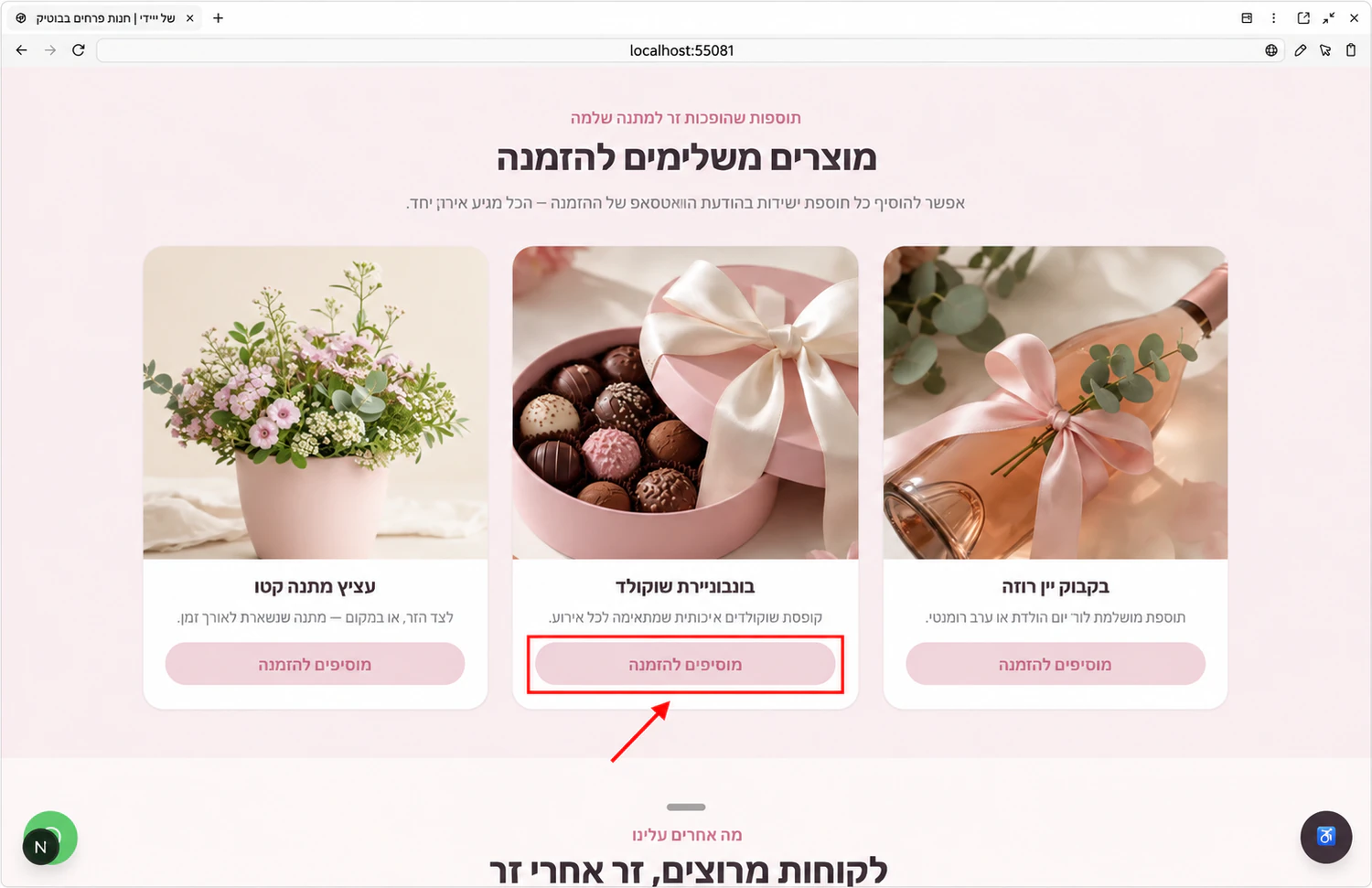
במפגש הרביעי נבנה אתר הדגמה לחנות פרחים בשם ״החנות של דייזי״: צבעי פסטל, הצגת זרים, מוצרים משלימים, פרטי קשר וכפתורי הזמנה. זו הדגמה שמראה את התהליך, ולא הוכחה שחנות מסחרית מלאה נבנתה ונבדקה.
שלוש השיטות משלימות זו את זו. מתחילים באפיון חופשי כדי להסביר מה העסק צריך. מוסיפים צילום מסך כדי לחדד כיוון עיצובי. אחר כך משלבים רכיב מוכן כשצריך לפתור חלק מסוים בעמוד.
לתרגול פתחו תיקייה נפרדת בשם flower-site. הוסיפו brief.md, לוגו ותמונות שמותר לכם להשתמש בהן. למדו מהדוגמה, אבל הזינו את פרטי העסק שלכם. אם אין עדיין פרטי עסק אמיתיים, סמנו את הפרויקט כדוגמה ואל תפרסמו אותו כעסק פעיל.
שיטה 1 · אפיון חופשי לפני עיצוב
אני רוצה אתר בעברית וב-RTL לחנות פרחים. קרא את brief.md ואת התמונות בתיקייה. הכיוון הוא צבעי פסטל וטקסט קריא. הדף יכלול פתיחה ברורה, סוגי זרים, מוצרים משלימים, פרטי החנות ודרך ליצור קשר.

שאל אותי מה חסר, במיוחד איך מזמינים בפועל: טלפון, WhatsApp או חנות עם תשלום. אל תבנה סליקה אם לא ביקשתי. אל תמציא כתובת, מספר טלפון, מחירים או המלצות. אם חסר חומר, סמן אותו כחסר.

הצג תוכנית עם סדר החלקים, הפעולה הראשית של המבקר ויעד של כל כפתור. הסבר אם נדרש שרת או מסד נתונים. בשלב הזה אל תשנה קבצים ואל תפרסם. אחרי אישורי נבנה ונבדוק את האתר בדפדפן.
הדביקו בכלי המתואר במדריך. מלאו את הפרטים שבסוגריים ובדקו את התוצאה מול המקור.
אחרי התוכנית · בונים ופותחים תצוגה מקומית
קראו את התוכנית וחפשו פערים: האם ביקשתם הזמנה ב-WhatsApp והוא מתכנן חנות סליקה? האם הוא הוסיף המלצות שלא סיפקתם? האם שעות הפתיחה תומללו נכון? תקנו את ההנחות לפני האישור. אפשר להכתיב את האפיון, אבל קראו את הטקסט שהתקבל לפני השליחה.
אשרו את הבנייה ובקשו לפתוח את האתר בתצוגה מקומית. הכתובת יכולה להיות localhost עם מספר יציאה שונה בכל פרויקט. זו כתובת לצפייה בסביבת העבודה שלכם; כדי לשלוח אתר נגיש לאחרים צריך לפרסם אותו.
בהדגמה האתר נראה מוכן, אבל עמיחי ציין שחלק מהכפתורים עדיין לא מובילים ליעד. לכן אל תעצרו בצילום יפה: הכניסו פרטי קשר אמיתיים, הגדירו את הפעולות ולחצו על כל כפתור. טופס שמציג ״נשלח״ אינו הוכחה שהפנייה נשמרה או התקבלה.
שיטה 2 · השראה מצילום מסך
נתח את צילום המסך שצירפתי: סדר החלקים, היררכיית הכותרות, ריווח, צבעים וסוגי רכיבים. הסבר מה מתאים לאתר שלנו ולמטרה שב-brief.md. צור עיצוב מקורי בהשראת העקרונות האלה עם התוכן והמותג שלי. אל תעתיק טקסטים, לוגואים, תמונות או קוד מהאתר המקורי. השתמש רק בנכסים שהרשיתי להשתמש בהם. הצג תחילה את הכיוון המוצע; אחרי האישור בנה מקטע אחד, פתח תצוגה ונבדוק לפני שממשיכים.הדביקו בכלי המתואר במדריך. מלאו את הפרטים שבסוגריים ובדקו את התוצאה מול המקור.
שיטה 3 · משפרים רכיב אחד בכל פעם
בסדנה הודגמו ספריות רכיבים כגון 21st.dev, Magic UI, React Bits ו-shadcn/ui. רכיב הוא חלק מהאתר: כרטיס מוצר, גלריה, לוח שנה או כפתור. בוחרים חלק מתאים, מצרפים את הוראות השימוש או הקוד ומסבירים לקלוד איפה לשלב אותו.
בהדגמה נוספו הצעות לרכיבים לאתר הפרחים, ובהמשך נבחר כרטיס מוצר. לפני התקנה בקשו לבדוק התאמה לטכנולוגיה של האתר, רישיון שימוש, RTL וביצועים בנייד. לא כל אנימציה יפה מקדמת את מטרת הדף.
גם גופן וצבעים משנים את התוצאה. במפגש הוצגו Google Fonts ופלטות צבעים: בוחרים גופן שתומך בעברית, בודקים את הרישיון ומנסים אותו על טקסט אמיתי. אם משתמשים בסקיל עיצוב או נגישות, בודקים את השינוי בעצמכם; הסקיל אינו אישור שהאתר עומד בכל דרישה.
שילוב רכיב · שינוי ממוקד עם בדיקה
אני מצרף קישור לרכיב שאני רוצה להוסיף: [הקישור]. בדוק את הרישיון, התלויות וההתאמה לפרויקט הקיים. אני רוצה לשפר רק את [כרטיסי המוצר / הגלריה / אזור אחר]. שמור על התוכן המאושר, עברית, RTL וצבעי המותג. אל תשנה חלקים אחרים. הצע קודם איך הרכיב יועיל למבקר. לאחר אישור, שלב אותו ובדוק במחשב ובנייד, כולל מקלדת, זמני טעינה ופעולת הכפתורים.הדביקו בכלי המתואר במדריך. מלאו את הפרטים שבסוגריים ובדקו את התוצאה מול המקור.
מהאתר הראשון לאתר מדויק יותר
GitHub, Vercel ו-Supabase · כל כלי והתפקיד שלו
GitHub שומר את הקוד והיסטוריית הגרסאות שהעליתם למאגר. כדי לעבור למחשב אחר משכפלים את המאגר ומסנכרנים שינויים באופן מסודר. הקוד לא מסתנכרן בין מחשבים רק מפני שהתחברתם לאותו חשבון Claude. שמרו גרסה לפני שינוי גדול ובדקו שקובצי הסודות אינם במאגר.
Vercel מארח את האתר בכתובת ציבורית. אחרי הפריסה פותחים את הקישור ממכשיר נוסף ובודקים שהתוצאה האחרונה אכן מופיעה. בדקו שהפרויקט מקושר לחשבון הנכון ושמשתני הסביבה מוגדרים גם שם. מסלול Hobby מיועד לשימוש אישי ולא מסחרי; אתר עסקי צריך מסלול מתאים.
Supabase יכול לשמור מידע ולהוסיף התחברות. מוסיפים אותו כשיש צורך בנתונים שנשמרים, למשל פניות או היסטוריית שיחות. דף תדמית עם קישור לטלפון אינו חייב מסד נתונים. כששומרים מידע, בודקים מי רשאי לקרוא ולעדכן אותו.
בסוף מפגש 4 הוזכר מפגש המשך על WordPress ודומיין. המדריך הנוכחי מבוסס על ארבע ההקלטות של דור ב׳; ההכרזה על ההמשך אינה מוצגת כאן כהדרכה שכבר נכללה בהן.
בדיקת האתר · לפני פרסום
- תוכן · משווים את הטקסט למסמך העסק. מחליפים כל פרט דמה ומסירים המלצות או הבטחות שלא סופקו.
- נייד ונגישות · בודקים רוחב טלפון, עברית, סדר קריאה, ניגודיות, מקלדת ומיקוד. מתקנים גלילה אופקית וכפתורים שלא ניתן ללחוץ עליהם.
- תמונות · משתמשים בקבצים דחוסים בגודל שמתאים לתצוגה, בלי לפגוע בקריאות. מוסיפים טקסט חלופי תיאורי בעברית ומגדירים מידות למניעת קפיצות בעמוד.
- פעולות · לוחצים על כל כפתור. בטופס שולחים פנייה מבוקרת ליעד שלכם ומוודאים שנקלטה, כולל הודעת כשל כשהשירות אינו זמין.
- גרסה וסודות · שומרים נקודת חזרה, בודקים שאין מפתחות בקוד הציבורי ומגדירים את מה שנדרש בסביבת האירוח.
- אחרי פרסום · מוודאים שהפריסה הסתיימה בהצלחה, פותחים את הכתובת הציבורית מחוץ לסביבת הפיתוח ובודקים שוב את התוכן והפעולה הראשית. פרסום אינו מבטיח אינדוקס או דירוג בגוגל.
פרסום עם הוכחה · לא מסתפקים בהודעת סיום
בצע בדיקה של האתר הקיים מול brief.md. דווח על פרטי דמה, כפתורים ללא יעד, טפסים שלא נבדקו, בעיות בנייד וסודות שעלולים להיחשף. תקן את הליקויים ושמור גרסה שאפשר לחזור אליה. לאחר שאאשר פרסום, פרוס לפרויקט Vercel הנכון, עם משתני הסביבה הנדרשים ובלי להציג את ערכיהם. המתן לסיום מוצלח של הפריסה, פתח את הכתובת הציבורית ובדוק את הפעולה הראשית. בסיום מסור קישור, מה נבדק ומה עדיין לא אומת.הדביקו בכלי המתואר במדריך. מלאו את הפרטים שבסוגריים ובדקו את התוצאה מול המקור.
ממשיכים מחר · שומרים הקשר וחוסכים עבודה חוזרת
בסדנה עלו שוב ושוב שאלות על טוקנים, שיחות ארוכות ועבודה משני מחשבים. התחילו ממשימה ממוקדת והוסיפו רק את הקבצים הרלוונטיים. בחרו מודל ורמת מאמץ שמתאימים למשימה, ועקבו אחרי מסך Usage של החשבון.
חלון ההקשר של השיחה ומכסת השימוש בחשבון הם דברים שונים. שיחה חדשה אינה מאפסת מכסה, וקבצים קיימים אינם מעבירים לבדם את כל ההחלטות שנאמרו בצ׳אט. לפני מעבר לשיחה חדשה שמרו סיכום מצב קצר בתיקייה.
אם משהו נשבר, תארו מה עשיתם, מה ציפיתם שיקרה ומה קרה בפועל. צרפו צילום או הודעת שגיאה ללא פרטים רגישים, ובקשו תיקון ממוקד עם בדיקה. כך הופכים ניסוי חד-פעמי לתהליך עבודה שאפשר לחזור אליו.
סיכום להמשך · פותחים שיחה חדשה בלי להתחיל מאפס
שמור בתיקיית הפרויקט קובץ HANDOFF.md קצר: מטרת הפרויקט, החלטות שאושרו, קבצים מרכזיים, מה עובד, בדיקות שבוצעו, מה נשאר פתוח והצעד הבא. אל תכלול סודות או מידע אישי לא נחוץ. בשיחה הבאה נתחיל מקריאת הקובץ ובדיקת מצב הקבצים בפועל, בלי להניח שכל משימה שסוכמה כבר הושלמה.הדביקו בכלי המתואר במדריך. מלאו את הפרטים שבסוגריים ובדקו את התוצאה מול המקור.
שאלות שעלו בסדנה
צריך לדעת לתכנת כדי להתחיל?
אפשר לבצע את התרגילים דרך Desktop ובקשות בעברית. התפקיד שלכם הוא לספק מידע, לקרוא את התוכנית ולבדוק תוצאה. פרויקט שכולל משתמשים, תשלום או מידע רגיש דורש בדיקות שמתאימות למורכבות שלו.
מתקינים Git ו-Node.js לכל פרויקט מחדש?
לא. אלה כלים שמתקינים בסביבת העבודה. לפרויקט מסוים יכולות להיות תלויות או גרסאות משלו, ולכן מבקשים מקלוד לבדוק את הדרישות לפני התקנה נוספת.
אפשר לעבוד על אותו אתר משני מחשבים?
כן, באמצעות שמירה וסנכרון מסודרים, למשל דרך GitHub. בכל מחשב צריך סביבת עבודה מתאימה ועותק מעודכן של הפרויקט. התחברות לאותו חשבון Claude לבדה אינה מסנכרנת את התיקייה המקומית.
אם מפסיקים לשלם לקלוד, האתר נעלם?
הקבצים שיצרתם אינם תלויים במנוי כדי להישאר בתיקייה או במאגר שלכם. אתר שפורסם תלוי גם בשירותי האירוח והנתונים שלו. אפשר להמשיך לערוך את הקוד בכלי אחר שמתאים לפרויקט.
הסוכן עובד כשהמחשב כבוי?
סוכן שרץ רק על המחשב יפסיק כאשר סביבת ההרצה אינה פעילה. כדי שיענה באופן עצמאי צריך לארח את השרת בסביבה מתאימה, להגדיר חיבורים וסודות ולבדוק את העבודה דרך הכתובת הציבורית.
חייבים Maton, Supabase וכל הסקילים?
לא. מוסיפים כלים לפי המשימה. סוכן שעונה מקובץ אינו חייב יומן, ואתר ללא מידע שנשמר אינו חייב מסד נתונים. בחרו סקילים שאתם מבינים ומשתמשים בהם, והוסיפו עוד כשיש צורך ברור.
כמה עולה לעבוד לפי המדריך?
העלות מורכבת ממנוי העבודה ומכל שירות נוסף שבחרתם: API למודל, WhatsApp, תמונות, אירוח או נתונים. המסלולים משתנים. בדקו בחשבונות השירות את המחיר, המכסות ואופן עצירת השימוש לפני הפעלה רציפה.
איך יודעים שהצלחתי ולא רק קיבלתי הסבר יפה?
פותחים את הקובץ, משווים מייל או פגישה למקור, שולחים הודעת בדיקה לסוכן ולוחצים על כפתורי האתר. בכל שלב חייבת להיות תוצאה שניתן לבדוק מחוץ לתשובת קלוד.