OpenAI Codex · המדריך המלא בעברית
Codex: המדריך המלא בעברית
קודקס של OpenAI הוא סוכן שלא רק עונה, אלא מבצע: בונה כלים, אתרים ואוטומציות מתיאור בעברית. המדריך המלא מסביר את כל המשטחים, התקנה, משימה ראשונה, AGENTS.md, MCP, סוכנים במקביל ותהליכי עבודה אמיתיים לעסק, עם פרומפטים מוכנים להעתקה.
מאת עמיחי שקל · פורסם · עודכן
בקצרה
יש לכם רעיון לכלי שיחסוך לכם שעות כל שבוע: מחולל הצעות מחיר, דשבורד לנתונים, אוטומציה שמסכמת מיילים. ובכל פעם זה נתקע באותו מקום: אין מפתח, אין תקציב, ואין זמן ללמוד לתכנת.
קודקס (Codex) של OpenAI פותר בדיוק את זה. זה לא עוד צ'אט שנותן עצות, זה סוכן שמבצע: כותב קוד, יוצר קבצים, מריץ פקודות, בודק את עצמו בדפדפן, ומעלה את התוצר לאוויר. ואם יש לכם מנוי בתשלום ל-ChatGPT, כבר יש לכם גישה אליו.
זה המדריך המלא לקודקס בעברית. עוברים על כל המשטחים (האפליקציה, הענן, ה-CLI ותוסף ה-IDE), התקנה, משימה ראשונה, AGENTS.md, רמות חשיבה, MCP, סוכנים במקביל, ותהליכי עבודה אמיתיים לעסק. כולל פרומפטים מוכנים להעתקה.
מה קודקס עושה בפועל
- בונה אתרים, דשבורדים וכלים פנימיים מתיאור בעברית, בלי לכתוב שורת קוד
- הופך תמלול של שיחת מכירה להצעת מחיר מעוצבת עם חתימה דיגיטלית ולינק חי
- מריץ משימות בענן בזמן שהמחשב שלכם סגור, ומחזיר תוצר מוכן לבדיקה
- מפעיל כמה סוכני משנה במקביל, כך שמחקר של שעה נגמר בחלק מהזמן
- מתחבר ל-Gmail, ליומן, ל-Slack, ל-Notion ולכלים נוספים דרך תוספים ו-MCP
- שולט בעכבר ובמקלדת כדי לבצע פעולות בתוכנות שאין להן חיבור מסודר
- מתזמן אוטומציות שרצות לבד כל בוקר, כל שבוע או לפי אירוע
- בודק קוד ב-GitHub ומתקן את הבעיות שמצא בפקודה אחת
מה זה קודקס · סוכן שמבצע, לא צ'אט שמייעץ
קודקס הוא סוכן כתיבת קוד. מתחת למכסה יש מודל שפה של OpenAI, ומסביבו תשתית שנותנת לו ידיים: גישה לתיקייה במחשב, טרמינל, דפדפן, וחיבורים לכלים חיצוניים.
ההבדל מ-ChatGPT פשוט. ב-ChatGPT שואלים ומקבלים תשובה, ואז אתם מבצעים. בקודקס מתארים את התוצאה, והסוכן מבצע בעצמו: יוצר קבצים, מריץ אותם, רואה שמשהו נשבר, ומתקן עד שזה עובד.
הדרך הכי נכונה לחשוב עליו היא כעל עובד דיגיטלי חדש. הוא חכם מאוד, אבל לא מכיר את העסק שלכם. ככל שתתנו לו הקשר, כללים וכלים, הוא יעבוד טוב יותר. רוב המדריך הזה עוסק בדיוק בזה.
סוכן, סקיל וזיכרון · שלושה מושגים שצריך להכיר
סוכן הוא תוכנה שהמוח שלה הוא מודל שפה. בלי כלים הוא רק מדבר. ברגע שנותנים לו הרשאות לכלים, הוא מבצע מטלות בעולם הדיגיטלי: כותב קוד, גולש, קורא מיילים, מעדכן קבצים.
סקיל (Skill) הוא מתכון: קובץ הוראות שמלמד את הסוכן לבצע תהליך מסוים שוב ושוב באותה איכות. הסוכן הוא העובד, הסקיל הוא נוהל העבודה שלו. סוכן אחד יכול להשתמש בהרבה סקילים, ואפילו להפעיל סוכני משנה שיעזרו לו.
בלי קובץ זיכרון, לסוכן יש זיכרון של דג זהב. לכן בקודקס יש קובץ בשם AGENTS.md, שעליו נדבר בהמשך, שמזכיר לו בכל שיחה חדשה מי אתם ומה הכללים.
המשטחים של קודקס · איפה עובדים עם מה
קודקס הוא לא מוצר אחד אלא משפחה של כמה משטחים שעובדים עם אותו חשבון. בוחרים את המשטח לפי סוג העבודה, לא לפי מה שמוכר.
לבעלי עסקים שלא מגיעים מפיתוח, נקודת הפתיחה הנכונה היא כמעט תמיד אפליקציית הדסקטופ. היא ויזואלית, שומרת את כל השיחות, ומכילה בפנים טרמינל, דפדפן, תצוגת שינויים ואוטומציות.
חמשת המשטחים במשפט אחד
- אפליקציית הדסקטופ · חלון עבודה מלא ל-Mac ול-Windows עם פרויקטים, שיחות, טרמינל מובנה, דפדפן ותצוגת שינויים. המקום המומלץ להתחיל
- Codex Cloud · רץ בדפדפן בכתובת chatgpt.com/codex, מחובר ל-GitHub, מריץ משימות בקונטיינר מרוחק ופותח בקשות מיזוג (PR). המחשב שלכם לא צריך להיות דלוק
- Codex CLI · קודקס בתוך הטרמינל. מהיר, גמיש, ונוח למי שכבר רגיל לשורת פקודה
- תוסף IDE · תוסף רשמי ל-VS Code ולעורכים דומים כמו Cursor ו-Windsurf, שעובד ישירות על הקבצים הפתוחים
- Code Review ב-GitHub · בוט שבודק בקשות מיזוג ומתקן בעיות לפי פקודה בתגובה
טיפ
הכלל המעשי: עבודה יומיומית מקומית באפליקציה. משימה ארוכה שלא רוצים שתתקע את המחשב שולחים לענן. ומי שעובד כבר ב-VS Code או בטרמינל, משתמש בתוסף או ב-CLI. כל המשטחים חולקים את אותו חשבון ואת אותה מכסת שימוש.
התקנת אפליקציית קודקס · שלב אחר שלב
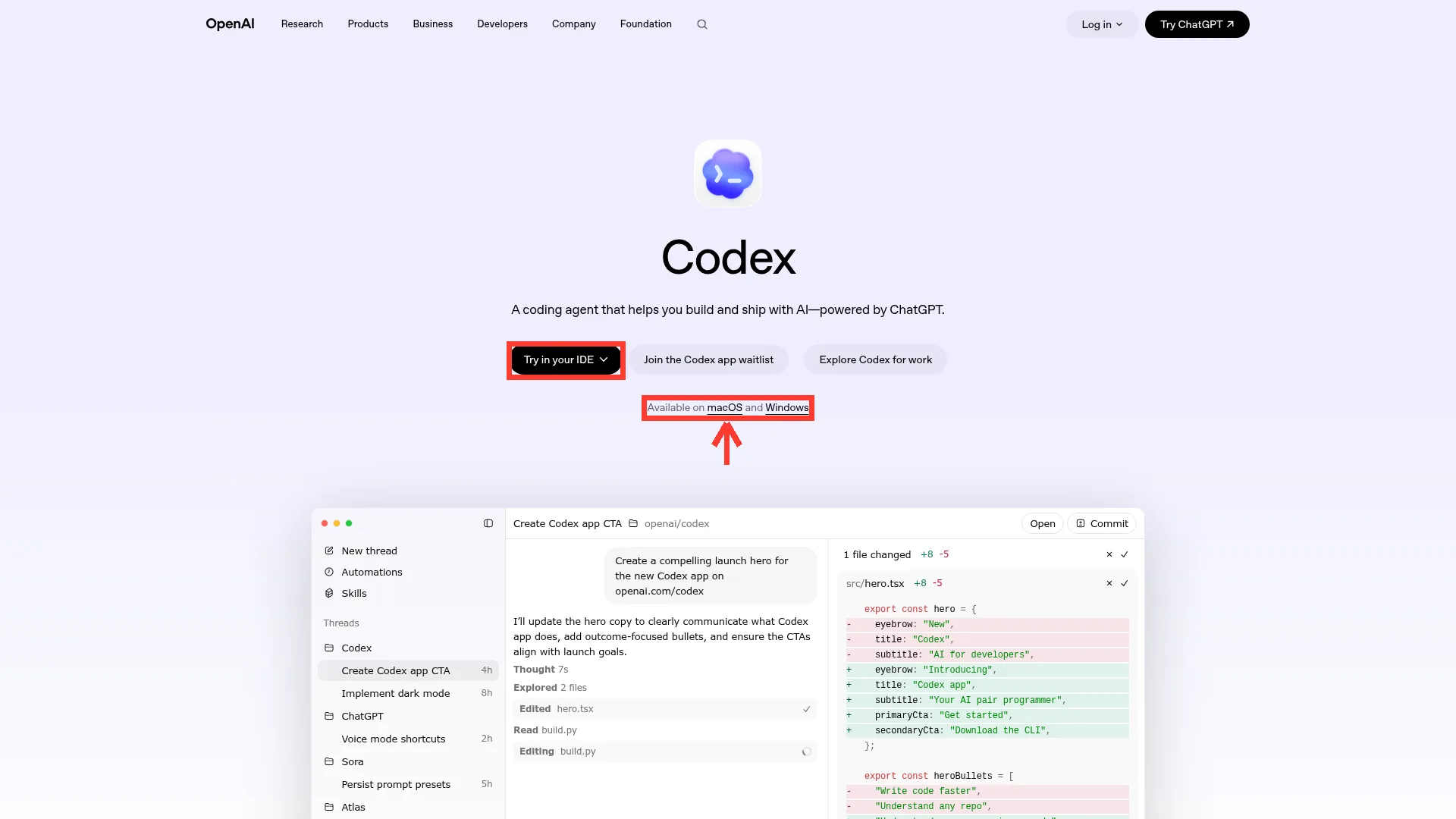
ההתקנה לוקחת כמה דקות. מחפשים בגוגל Codex OpenAI, נכנסים לעמוד הרשמי, ומורידים את האפליקציה ל-Mac או ל-Windows. בפתיחה הראשונה מתחברים עם חשבון ה-ChatGPT שלכם. קודקס דורש מנוי בתשלום, והוא לא זמין בחשבון החינמי במלואו.
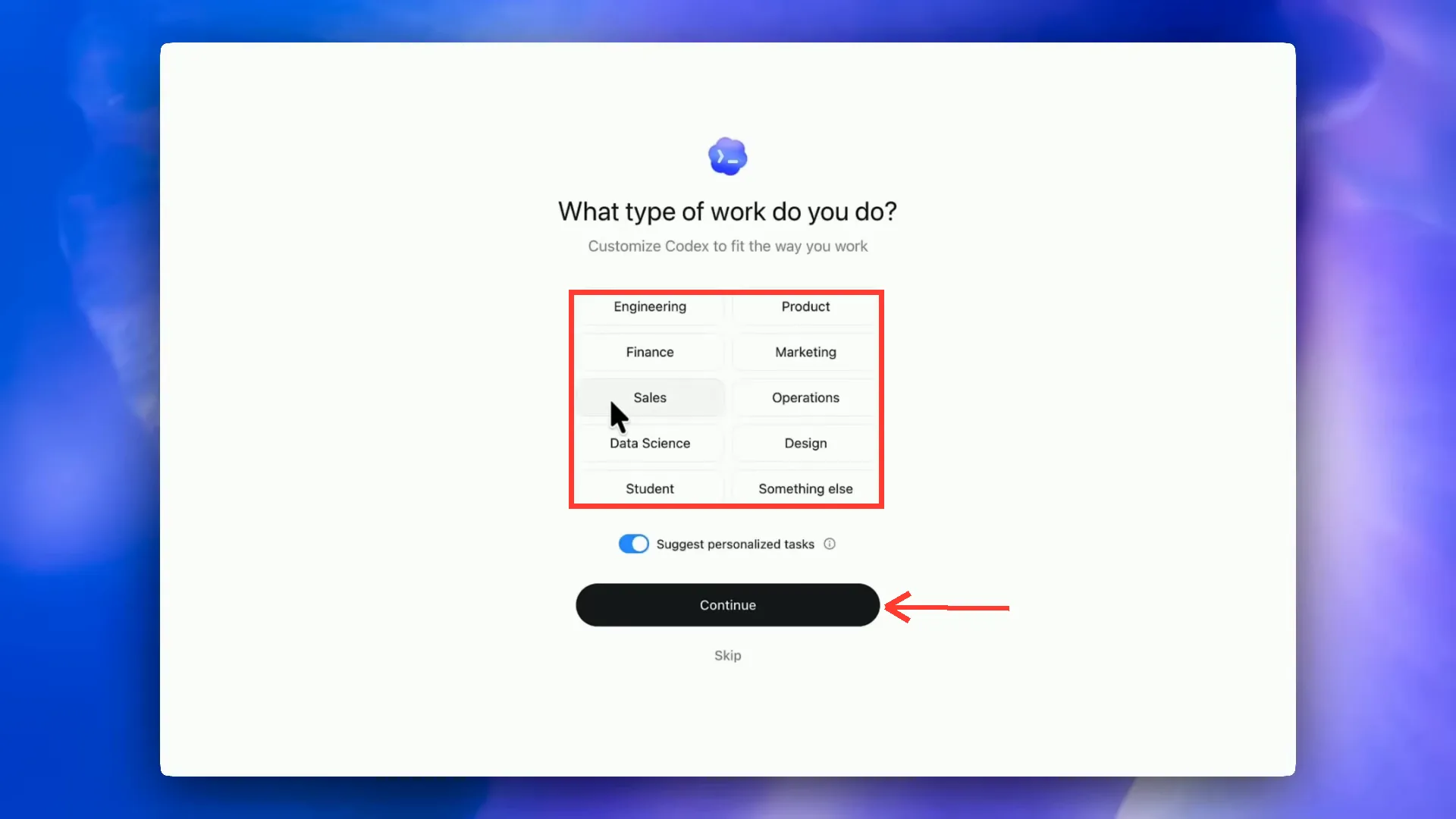
אחרי ההתחברות קודקס שואל על סוג העבודה שלכם ומתאים את עצמו. משם בוחרים פרויקט. חשוב להבין: פרויקט בקודקס הוא פשוט תיקייה במחשב. רעיון חדש מקבל תיקייה חדשה, והמשך עבודה נפתח על תיקייה קיימת. אותה תיקייה עובדת גם בקלוד קוד, כך שאפשר לעבור בין הכלים.
התקנה והפעלה בשבעה צעדים
- מחפשים Codex OpenAI ונכנסים לעמוד הרשמי openai.com/codex
- מורידים את הגרסה ל-Mac או ל-Windows ומתקינים
- מתחברים עם חשבון ChatGPT בתשלום
- עונים על שאלת סוג העבודה ולוחצים Continue
- יוצרים תיקייה חדשה לפרויקט ופותחים אותה כ-Project
- בוחרים הרשאות (בהתחלה Ask for approval), מודל ורמת חשיבה
- כותבים או מדברים בעברית מה אתם רוצים לבנות
סיור באפליקציה · threads, טרמינל, Review ו-Annotate
האפליקציה בנויה כמו סביבת עבודה. בצד שמאל רשימת הפרויקטים והשיחות. במרכז הצ'אט. ויש כמה כלים שכדאי להכיר מהיום הראשון.
כל שיחה נקראת thread, והיא נשמרת גם אחרי שסוגרים את האפליקציה. יש טרמינל מובנה (Cmd+J ב-Mac, Ctrl+J ב-Windows), עץ קבצים, ופאנל Review שמראה בדיוק מה השתנה בכל קובץ לפני שמאשרים. יש דפדפן מובנה שבו רואים את מה שנבנה, ומצב Annotate שבו מסמנים עיגול על כפתור ביד וכותבים לידו מה לשנות, במקום לתאר במילים.
אפשר לגרור תמונה לתוך הצ'אט (צילום מסך של אתר שאהבתם, סקיצה, לוגו) וקודקס משתמש בה כרפרנס. יש גם הכתבה קולית, כך שאפשר לתת משימות בדיבור.
הרשאות · כמה חופש לתת לסוכן
ליד תיבת הכתיבה בוחרים כמה חופש לתת לסוכן. Ask for approval עוצר ושואל על כל פעולה. מצב ברירת המחדל מאפשר לו לעבוד בתוך תיקיית הפרויקט בלבד. Full access נותן לו לפעול בכל המחשב, להריץ פקודות ולגשת לרשת בלי לעצור.
ההמלצה: התחילו ב-Ask for approval, קראו מה הוא מבקש להריץ, ושאלו אותו בעברית כשמשהו לא ברור. אחרי שצברתם ביטחון, Full access חוסך המון עצירות. מי שעובד ב-Full access באופן קבוע, כדאי שיתקין שכבת הגנה שחוסמת פקודות הרסניות כמו מחיקה גורפת, ושיבדוק את פאנל ה-Review לפני שהוא מאשר שינויים.
לפני שנותנים לקודקס לשנות משהו בפרויקט קיים, ודאו שיש גיבוי או ניהול גרסאות (Git). סוכן יכול להרוס תיקייה מהר מאוד אם הוא הבין לא נכון. עם Git, כל טעות היא לחיצת ביטול.
המשימה הראשונה · מתכננים לפני שמבצעים
הטעות הכי נפוצה של מתחילים: לכתוב בקשה ענקית ועמומה כמו תבנה לי אפליקציה, ולקבל משהו גנרי. המשימה הראשונה צריכה להיות קטנה, ברורה, ובעלת תנאי סיום.
שני הרגלים שעושים את ההבדל. הראשון: להתחיל במצב Plan. במצב הזה קודקס רק כותב תוכנית מה הוא הולך לעשות, בלי לגעת בקבצים. קוראים, מתקנים, ורק אז מאשרים ביצוע. השני: לתת תנאי סיום. כשהסוכן יודע איך נראית הצלחה, הוא בודק את עצמו ומתקן לבד במקום שאתם תהיו שכבת הבדיקה.
עוד טיפ מהשטח: התוצר של AI הוא הסתברותי. אם התוצאה הראשונה חלשה, אל תנסו לתקן אותה בכוח. בקשו 3 גרסאות שונות ובחרו את הטובה.
תבנית בקשה לקודקס · מטרה, הקשר, מגבלות, תנאי סיום
מטרה:
{מה אתם רוצים שקודקס יבנה או יתקן, במשפט אחד}

הקשר:
{מי המשתמש, אילו קבצים או מסמכים רלוונטיים, מה כבר קיים}

מגבלות:
{סגנון, שפה, טכנולוגיה מועדפת, ודברים שאסור לשנות}

תנאי סיום:
{איך יודעים שזה עובד. למשל: הדף נפתח בדפדפן בלי שגיאות, כל הכפתורים עובדים, הטקסט בעברית ומיושר לימין}

לפני שאתה מתחיל, בנה תוכנית עבודה קצרה והצג לי אותה לאישור. אחרי הביצוע, פתח את התוצאה בדפדפן, בדוק אותה בעצמך ותקן כל בעיה שמצאת.
הדביקו בכלי המתואר במדריך. מלאו את הפרטים שבסוגריים ובדקו את התוצאה מול המקור.
פרומפט היכרות · לפני שנוגעים בכלום
אני בעל עסק ולא מתכנת. תסביר לי בשפה פשוטה מה יש בתיקייה הזאת, מה כל חלק עושה, ומה שלושת הדברים הכי שימושיים שאפשר לבנות כאן בשבילי. אל תשנה אף קובץ.הדביקו בכלי המתואר במדריך. מלאו את הפרטים שבסוגריים ובדקו את התוצאה מול המקור.
משימות בענן · מאצילים ומשחררים את המחשב
Codex Cloud הוא המקום שבו מאצילים משימה ומשחררים את המחשב. נכנסים ל-chatgpt.com/codex, מחברים את GitHub (כפתור Connect GitHub, או Settings ואז Data controls), ויוצרים Environment: בוחרים את מאגר הקוד (repo) שהסוכן יעבוד עליו.
בהגדרות הסביבה קובעים כמה דברים: האם לסוכן יש גישה לאינטרנט, אילו גרסאות של שפות מותקנות בקונטיינר, משתני סביבה, וסקריפט התקנה שרץ בכל פעם שהסוכן מתחיל לעבוד. אם אין לכם מושג מה לבחור, ברירת המחדל Automatic מספיקה לרוב הפרויקטים.
בכל משימה יש שני כפתורים, וההבדל ביניהם קריטי. Ask קורא את הקוד ועונה בלי לשנות כלום. Code כותב שינויים, מריץ בדיקות, ומחזיר סיכום, צילום מסך ותצוגת שינויים. משם לוחצים Create PR והשינוי עולה ל-GitHub לבדיקה.
משימה בענן מההתחלה ועד PR
- מחברים את GitHub בכתובת chatgpt.com/codex
- יוצרים Environment ובוחרים את ה-repo ואת הענף (בדרך כלל main)
- שולחים שאלה עם Ask כדי להבין את הפרויקט בלי לשנות אותו
- שולחים משימה מפורטת עם Code
- בודקים את הסיכום, צילום המסך ותצוגת השינויים
- לוחצים Create PR, בודקים, וממזגים ב-GitHub
- מעבירים את המשימה לארכיון כדי לשמור על סדר
שימו לב
לחיצה על Code כשרציתם רק הסבר מרימה סביבת פיתוח שלמה ועלולה לייצר שינויים וענפים מיותרים. שאלה = Ask. שינוי = Code. ובקשה עמומה בענן יקרה במיוחד, כי אתם לא שם כדי לתקן באמצע. פרטו התנהגות, עיצוב ומקרי קצה מראש.
האצלה מהתוסף לענן · ומתי לא למהר
האצלה לענן לא חייבת להתחיל מהדפדפן. בתוסף ה-IDE אפשר להחליף את יעד ההרצה מ-Local ל-Run in the cloud, ולבחור אם הסוכן יתחיל מהענף הראשי או מהשינויים המקומיים שלכם. כשהמשימה מסתיימת, פותחים אותה בתוסף ולוחצים Apply כדי למשוך את השינויים למחשב.
שימו לב: Apply מחיל את השינויים על הענף שפתוח אצלכם כרגע. ודאו שאתם בענף הנכון לפני הלחיצה.
הסתייגות הוגנת: חלק מהמדריכים המנוסים ממליצים למתחילים לא למהר לענן. סביבה מרוחקת מוסיפה מורכבות של הרשאות, מפתחות והגדרות. התחילו מקומית, ועברו לענן כשיש משימה ארוכה שבאמת מצדיקה את זה.
Code Review ב-GitHub · עין שנייה על כל שינוי
קודקס יכול לשמש כבודק קוד אוטומטי ב-GitHub. בהגדרות של Codex נכנסים ללשונית Code review, מחפשים את ה-repo ומפעילים. מהרגע הזה, בכל בקשת מיזוג אפשר לכתוב תגובה עם פקודה, והבוט עונה.
בהדגמה שבה זה נבחן, קודקס בנה טופס עם ולידציה, ובבדיקה עצמית מצא באג לוגי בקוד שהוא עצמו כתב. תגובה אחת נוספת, והוא תיקן את הבאג באותו ענף ועדכן את בקשת המיזוג.
למה זה רלוונטי למי שלא מתכנת? כי זו שכבת בקרה שנייה בחינם. גם אם קוד נכתב על ידי פרילנסר, סוכן אחר או קלוד קוד, אפשר לבקש מקודקס עין נוספת לפני שמעלים לאוויר.
שלוש הפקודות לתגובות ב-GitHub
@codex review

@codex address this feedback

@codex fix this CI failure
הדביקו בכלי המתואר במדריך. מלאו את הפרטים שבסוגריים ובדקו את התוצאה מול המקור.
Codex CLI · פקודות סלאש וחזרה לסשן
ה-CLI הוא קודקס בתוך הטרמינל. מתקינים עם npm install -g @openai/codex (או brew install codex ב-Mac), מתחברים עם codex login, נכנסים לתיקיית הפרויקט ומקלידים codex.
בתוך הסשן עובדים עם פקודות סלאש. /status מראה מודל, חשבון וצריכת טוקנים. /model מחליף מודל ורמת חשיבה. /approvals קובע הרשאות. /compact מסכם את השיחה כדי לפנות מקום בזיכרון. ו-/quit יוצא.
הפקודה הכי שימושית היא codex resume. היא מציגה רשימה של סשנים קודמים, אפשר לחפש לפי מילה ולחזור בדיוק למקום שבו עצרתם. עוד שני טריקים: הקלדת @ ושם קובץ ממקדת את הסוכן בקובץ מסוים, וגרירת תמונה לטרמינל נותנת לו רפרנס ויזואלי.
הפקודות הבסיסיות של ה-CLI
npm install -g @openai/codex
codex login
codex

/status
/model
/approvals
/compact
/quit

codex resume
הדביקו בכלי המתואר במדריך. מלאו את הפרטים שבסוגריים ובדקו את התוצאה מול המקור.
תוסף ה-IDE · קודקס בתוך VS Code
מי שעובד ב-VS Code, ב-Cursor או ב-Windsurf מתקין את התוסף הרשמי. חפשו OpenAI Codex בחנות התוספים, לא רק Codex, אחרת יופיעו קודם תוספים של צד שלישי. מתחברים עם Sign in with ChatGPT.
לתוסף יש מצבים: Chat or Plan קורא ועונה בלי לשנות, Agent עורך קבצים ומריץ פקודות בתוך הפרויקט, ו-Agent full access פועל גם מחוץ לתיקייה ועם גישה לרשת.
פיצ'ר נחמד במיוחד: כותבים בקוד הערת TODO שמתארת מה חסר, ומעליה מופיע קישור Implement with Codex. לחיצה אחת, והסוכן מממש את מה שכתבתם.
הקשר ורמות חשיבה · מתי Medium ומתי High
שני כפתורים קובעים כמה טוב וכמה מהר קודקס יעבוד: ההקשר שנותנים לו, ורמת החשיבה.
הקשר: ככל שמציינים במפורש אילו קבצים רלוונטיים (עם @), מצרפים צילום מסך של מה שרוצים לקבל, או מסמך בריף, הסוכן מנחש פחות וטועה פחות. תמונה אחת של כפתור שאהבתם חוסכת פסקה שלמה של תיאור.
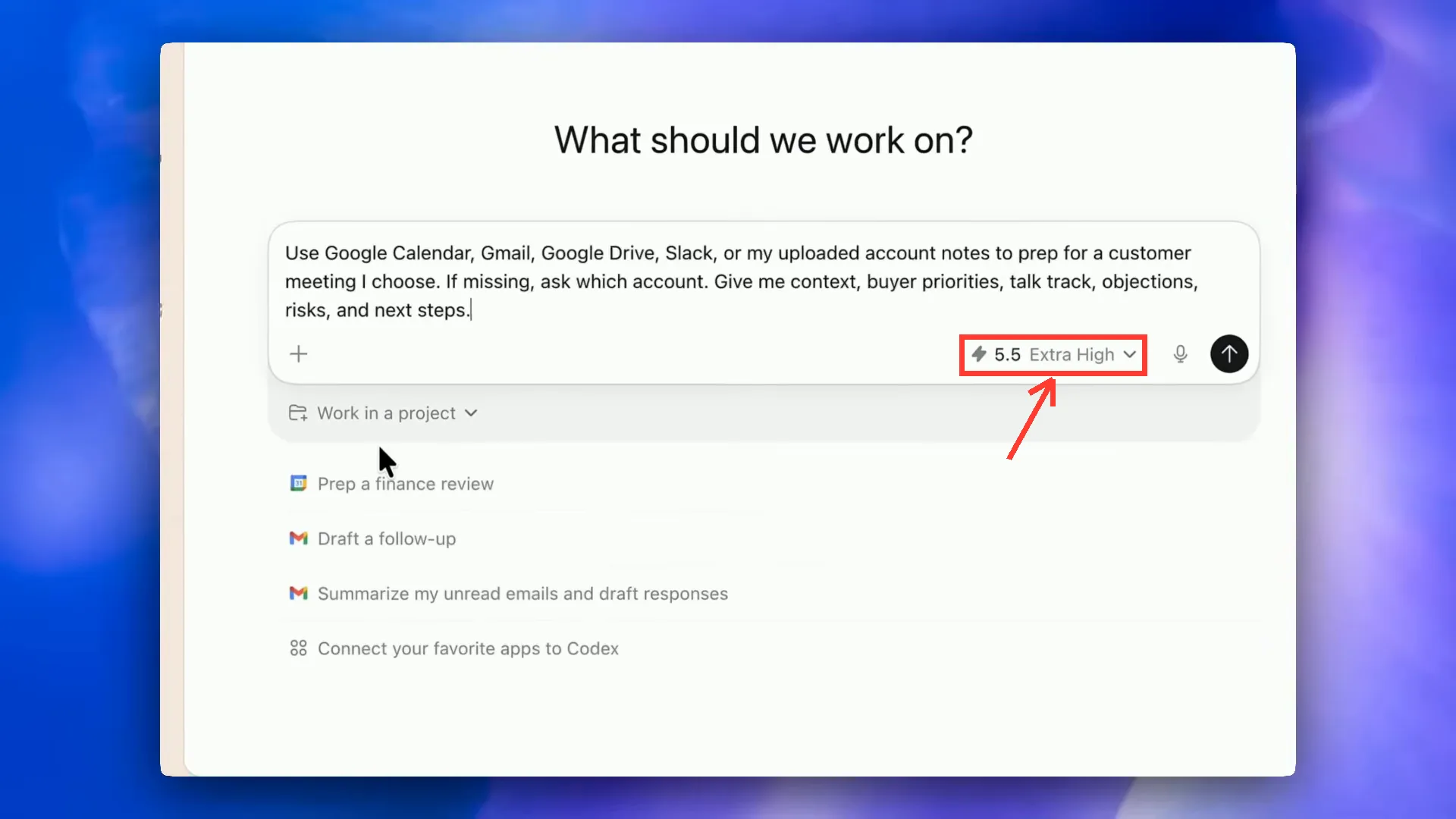
רמת חשיבה: Low או Light מהירה וחסכונית, מתאימה לתיקון טקסט או שינוי קטן. Medium היא ברירת מחדל טובה לרוב העבודה. High ו-Extra High איטיות יותר וצורכות יותר, ושומרים אותן למשימות מורכבות עם הרבה קבצים או באג עקשן. יש גם מצב Fast שמאיץ את התגובה אבל צורך בערך פי 2 מהמכסה.
וזיכרון השיחה לא אינסופי. שיחה ארוכה מדי מצטברת בהקשר לא רלוונטי, הביצועים יורדים והצריכה עולה. משימה חדשה = שיחה חדשה, או /compact כדי לדחוס.
טיפ
אל תבחרו Extra High לתיקון של מילה, ואל תבחרו Low לבניית מערכת. וכשמגדירים אוטומציה, בדקו איזה מודל היא מריצה. אוטומציות לא תמיד יורשות את ההגדרה של השיחה, ומשימה מורכבת על מודל חלש נכשלת בשקט.
AGENTS.md · הזיכרון הקבוע של הפרויקט
AGENTS.md הוא קובץ טקסט בתיקיית הפרויקט שקודקס קורא בתחילת כל שיחה. זה ה-README של הסוכן: מי אתם, מה מטרת הפרויקט, איך עובדים, מה אסור. זה תקן פתוח שכלים נוספים מכירים, והמקביל שלו בקלוד קוד הוא CLAUDE.md.
הדרך הכי מהירה ליצור אותו: הפקודה /init. קודקס סורק את התיקייה וכותב טיוטה. אחר כך עוברים עליה ומוסיפים את מה שרק אתם יודעים.
שלושה כללים. אם אתם מסבירים לקודקס משהו בפעם השלישית, זה צריך להיכנס לקובץ. אל תעמיסו עליו, כי הוא נקרא בכל בקשה וצורך טוקנים. ועדכנו אותו כשהפרויקט משתנה, אחרת הסוכן ימשיך לעבוד לפי כללים ישנים. מי שעובד גם עם קלוד קוד, יכול לבקש מהסוכן לשמור את שני הקבצים זהים.
פרומפט ליצירת AGENTS.md לעסק
צור קובץ AGENTS.md בתיקייה הזאת. תשאל אותי קודם 5 שאלות קצרות על העסק שלי, על קהל היעד ועל מטרת הפרויקט. אחרי שאענה, כתוב קובץ קצר וברור עם הסעיפים: על העסק, מטרת הפרויקט, עקרונות עבודה, שפה וסגנון (עברית, מיושר לימין), ומה אסור לעשות (למשל: לא לחשוף מפתחות API, לא למחוק קבצים בלי אישור, לא לשנות מבנה תיקיות בלי לשאול).הדביקו בכלי המתואר במדריך. מלאו את הפרטים שבסוגריים ובדקו את התוצאה מול המקור.
תוספים ו-MCP · נותנים לסוכן ידיים
בלי חיבורים, קודקס עובד רק על התיקייה שלכם. עם חיבורים, יש לו ידיים בכל הכלים של העסק. יש שתי דרכים לחבר.
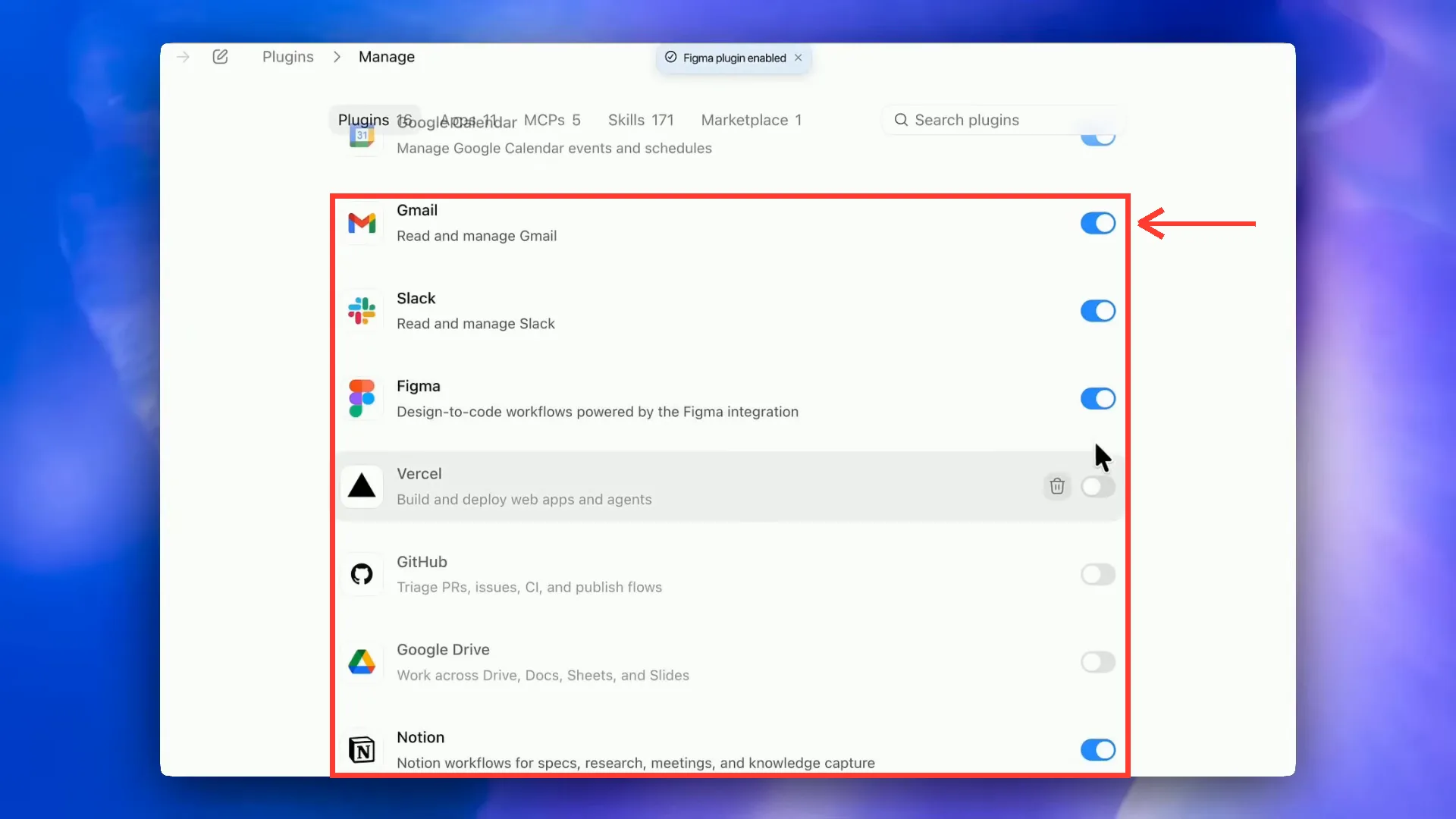
תוספים (Plugins) הם חיבורים מוכנים: Gmail, יומן Google, Slack, Notion, GitHub, Vercel, Netlify ועוד. מתקינים מהתפריט, מאשרים, ומפעילים בצ'אט עם @ ושם הכלי. למשל: לבקש מ-@Gmail לסכם מיילים על שיתופי פעולה מ-72 השעות האחרונות, ואז מ-@Google Calendar להציע זמנים פנויים לשיחה.
MCP הוא התקן הפתוח לחיבור כלים שאין להם תוסף. בהגדרות, תחת MCP servers, לוחצים Add server ובוחרים STDIO (פקודה שרצה מקומית) או Streamable HTTP (כתובת מרוחקת עם טוקן). מאחורי הקלעים ההגדרות נשמרות בקובץ config.toml גלובלי, כך שחיבור אחד זמין בכל הפרויקטים.
דוגמה שימושית: Context7, שרת שמביא לסוכן תיעוד עדכני של ספריות קוד, כדי שלא יכתוב לפי מידע ישן. אפשר גם להוסיף ל-AGENTS.md שורה שמורה לו להשתמש בו תמיד לפני שהוא עובד עם ספרייה חדשה.
שימו לב
שלוש אזהרות על חיבורים. תוסף מוכן לא תמיד חושף את כל היכולות של הכלי, ולפעמים צריך סקיל או חיבור ישיר. קובץ ההגדרות מכיל מפתחות API, אז לא מציגים אותו במסך משותף ולא מעלים אותו ל-GitHub. וכשסוכן קורא אתרים חיצוניים, טקסט זדוני באתר יכול לנסות להטות אותו. התקינו רק ממקורות רשמיים.
סקילים · הופכים תהליך מוצלח לכלי קבוע
סקיל הוא תיקייה עם קובץ SKILL.md: שם, תיאור, ושלבי עבודה. התיאור הוא החלק הכי חשוב, כי לפיו קודקס מחליט מתי להפעיל את הסקיל לבד. אפשר לצרף לתיקייה סקריפטים וקבצי רפרנס, והסוכן טוען אותם רק כשצריך.
סקיל שנשמר בתוך הפרויקט זמין רק שם. סקיל שנשמר בתיקיית המשתמש זמין בכל הפרויקטים. מפעילים סקיל בצ'אט עם / ושם הסקיל.
הדרך הכי פשוטה ליצור סקיל היא לא לכתוב אותו. עושים את התהליך פעם אחת בשיחה, מתקנים עד שהתוצאה טובה, ואז מבקשים מקודקס לארוז את מה שקרה עכשיו לסקיל. כך תהליך שעבד פעם אחת הופך לכלי שעובד כל פעם. וכל סקיל שעובד בקלוד קוד יעבוד גם בקודקס, כי בסוף אלה קבצי הוראות.
פרומפט · לארוז שיחה מוצלחת לסקיל
הפוך את מה שעשינו עכשיו בשיחה הזאת לסקיל. תן לו שם קצר באנגלית ותיאור שמסביר מתי להשתמש בו. כתוב את השלבים בדיוק כמו שעבדו בסוף, כולל התיקונים שעשינו בדרך, אילו קלטים צריך לבקש ממני, ואיך נראה תוצר תקין. מהיום, בכל פעם שאבקש משהו דומה, תשתמש בסקיל הזה.הדביקו בכלי המתואר במדריך. מלאו את הפרטים שבסוגריים ובדקו את התוצאה מול המקור.
Computer Use ודפדפן · כשאין חיבור, הסוכן לוחץ בעצמו
Computer Use מאפשר לקודקס לראות את המסך ולהזיז עכבר ומקלדת. זה הפתרון לתוכנות שאין להן API: מערכת הנהלת חשבונות ישנה, ממשק ניהול שדורש קליקים, או פתיחת Canva והכנת עיצוב. מפעילים בהגדרות, ונדרשת הרשאה במערכת ההפעלה.
שימוש נוסף, אולי החשוב ביותר: בדיקה. אחרי שקודקס בונה דשבורד, מבקשים ממנו לפתוח אותו בדפדפן, ללחוץ על כל כפתור, ולתקן כל מה שנראה שבור. מודלים כותבים לפעמים קוד שעובד טכנית אבל נראה רע, וזו הדרך לתפוס את זה.
המגבלות: זה איטי יותר מחיבור ישיר, זה יכול להיתקע כשמסך נטען לאט, ובחלק מהגרסאות היכולת זמינה רק ב-Mac. המחשב צריך להיות דלוק וער.
סוכנים במקביל · מחקר של שעה בחלק מהזמן
ברירת המחדל של סוכן היא לעבוד בטור: משימה, ואז הבאה. כשיש כמה משימות עצמאיות, זה בזבוז. סוכני משנה (Subagents) פותרים את זה: הסוכן הראשי מפצל את העבודה, כל סוכן משנה עובד במקביל עם זיכרון נקי משלו, והראשי מאחד את התוצאות בסוף.
בהדגמה אחת, 3 הצעות מחיר שלקחו 15 דקות בטור ירדו ל-5 דקות במקביל. בהדגמה אחרת, סוכני משנה קראו תיקייה שלמה של מסמכי מחקר, כל אחד מסמך, וסיכמו הכול לדוח אחד.
הסוד הוא לבקש את זה במפורש. קודקס לא תמיד יפצל לבד. ושני דברים לשים לב אליהם: סוכני משנה צורכים יותר מהמכסה בבת אחת, אז לבקש שישתמשו במודל זול יותר כשהמשימה פשוטה. ומשימות במקביל צריכות להיות באמת נפרדות. שני סוכנים שעורכים את אותו קובץ יוצרים התנגשויות.
בענן זה עובד אחרת אבל באותו רעיון: מבקשים מקודקס להציע 3 משימות עצמאיות, ולוחצים Start task על כל אחת. כל משימה רצה בקונטיינר נפרד ומחזירה PR משלה.
פרומפט · הפעלת סוכני משנה במקביל
יש לי {מספר} משימות עצמאיות: {רשימת המשימות, למשל: לחקור 5 מתחרים, או לסכם כל קובץ בתיקייה research}. הפעל סוכן משנה נפרד לכל משימה, שיעבדו במקביל. לכל סוכן משנה תן מודל חסכוני אם המשימה פשוטה. כל אחד שומר את התוצאה שלו לקובץ נפרד. בסוף, אחד את כל התוצאות לדוח אחד מסודר בעברית, הסר כפילויות, והדגש את 3 התובנות הכי חשובות.הדביקו בכלי המתואר במדריך. מלאו את הפרטים שבסוגריים ובדקו את התוצאה מול המקור.
אוטומציות · הסוכן עובד גם כשאתם לא
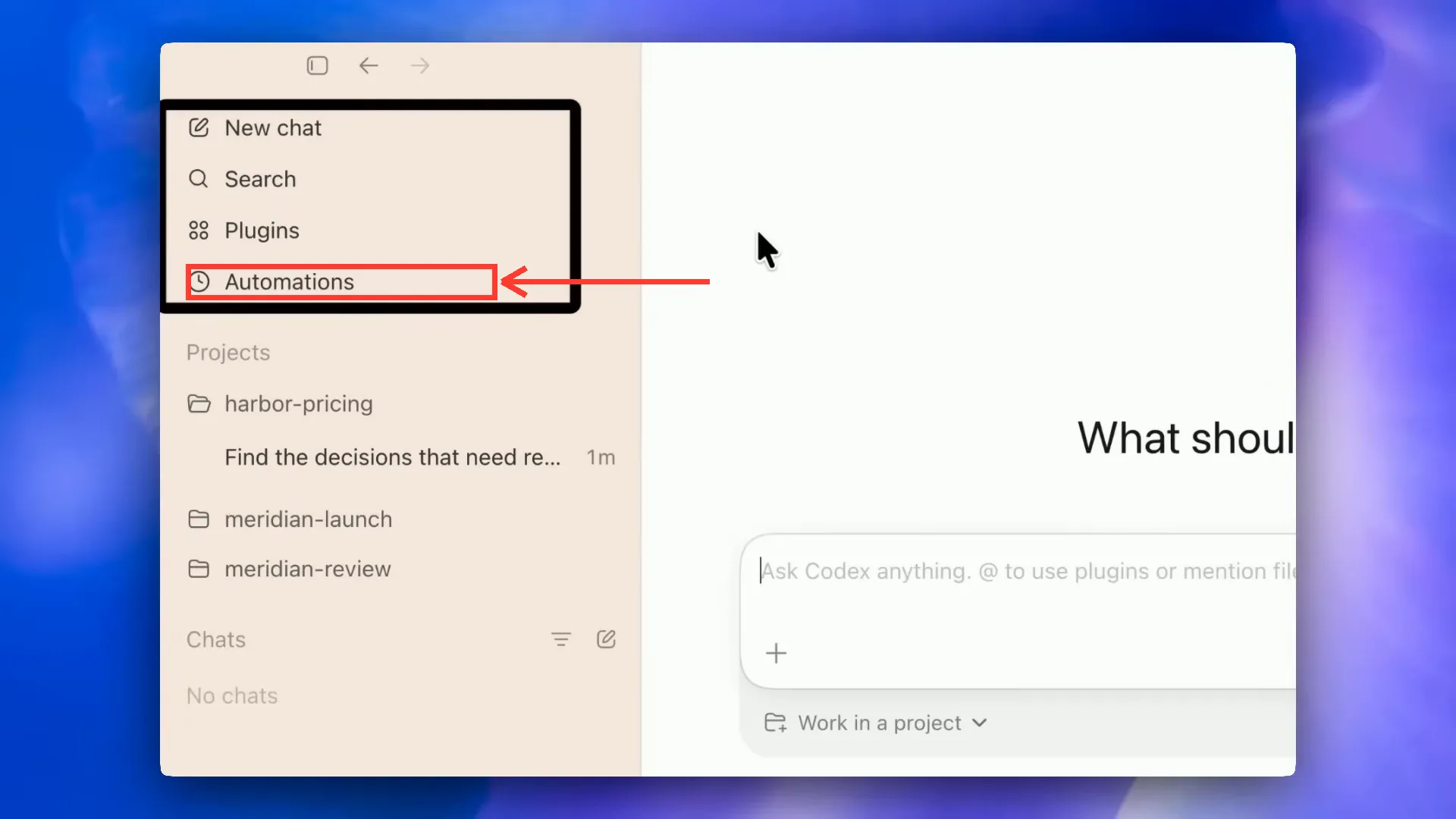
אוטומציות הן הרגע שבו קודקס מפסיק להיות כלי ומתחיל להיות עובד. בלשונית Automations בוחרים פרויקט, לוח זמנים ופרומפט, והמשימה רצה לבד. היא משתמשת בכל הסקילים ובקובץ AGENTS.md של אותו פרויקט.
אפשר גם ליצור אוטומציה ישירות מהצ'אט: אחרי שיחה שהצליחה, לבקש להפוך אותה לאוטומציה שרצה כל בוקר ב-08:00.
שלושה כללים. אוטומציה מקומית דורשת שהמחשב יהיה דלוק ולא במצב שינה, ואוטומציה בענן רצה גם כשהוא כבוי. קודם משכללים את הסקיל עד שהוא עובד מושלם, ורק אז מתזמנים. ומוסיפים קובץ יומן (ledger) שבו הסוכן רושם מה כבר טופל, אחרת הוא יעבד את אותו מייל או ניוזלטר שוב ושוב בכל הרצה.
תהליך Build and Ship · מרעיון לאתר חי שמתעדכן לבד
זה התהליך המלא שבו משתמשים בונים עם קודקס כלי אמיתי ומעלים אותו לאוויר, בהדגמה על דשבורד שמנתח תגובות מיוטיוב.
מתחילים בתיקייה ריקה ומבקשים מקודקס ליצור AGENTS.md עם הקשר על העסק והמטרה. מפתחות API נכנסים לקובץ .env.local ולא לצ'אט. אחר כך מבקשים את משימת הליבה, למשל למשוך את 200 התגובות האחרונות מהערוץ ולנתח אותן לדוח אקסל. כשזה עובד, אורזים את התהליך לסקיל.
משם מבקשים דשבורד שמציג את הנתונים, ונותנים לקודקס לפתוח אותו בדפדפן המובנה ולתקן את מה שנראה לא טוב. כשהכול מוכן, מבקשים ממנו ליצור repo פרטי ב-GitHub ולפרוס ל-Vercel דרך התוספים. ולבסוף אוטומציה שבועית שמריצה את הסקיל, מעדכנת את הנתונים ודוחפת ל-GitHub, מה שמעדכן את האתר החי בלי אף לחיצה.
השלבים בקצרה
- תיקייה חדשה + AGENTS.md עם הקשר על העסק
- מפתחות API בקובץ .env.local בלבד, והוראה לא להעלות אותו ל-GitHub
- משימת ליבה אחת שעובדת, ואז לארוז אותה לסקיל
- בניית ממשק ובדיקה ויזואלית בדפדפן המובנה
- repo פרטי ב-GitHub ופריסה ל-Vercel דרך התוספים
- אוטומציה מתוזמנת שמריצה את הסקיל ומעדכנת את האתר
פרויקט גדול · Issues, worktrees ובקשות מיזוג
כשהפרויקט גדל, עבודה בשיחה אחת כבר לא מספיקה. השיטה שמשתמשים מתקדמים עובדים בה נראית כמו צוות פיתוח קטן: מפרקים את התוכנית למשימות קטנות כ-Issues ב-GitHub, וכל משימה מקבלת ענף ו-worktree משלה.
Worktree הוא עותק נפרד של הפרויקט, כך שכמה סוכנים עובדים במקביל בלי לדרוס אחד את השני. מכיוון שעותק חדש לא כולל את הספריות המותקנות ואת קובצי המפתחות, מגדירים סקריפט התקנה קצר שרץ אוטומטית בכל worktree.
כל סוכן מסיים עם בקשת מיזוג. ממזגים לפי הסדר, קודם את מה שהאחרים תלויים בו. אם נוצרה התנגשות, מבקשים מקודקס לעדכן את הענף השני מול main ולפתור אותה בעצמו.
פרומפט · סוכן לוקח משימה ומחזיר PR
קח את Issue מספר {מספר} מ-GitHub. צור ענף חדש ב-worktree חדש ועבוד עליו שם. כשאתה מסיים, הרץ את הפרויקט ובדוק שהוא עובד, ואז פתח Pull Request עם תיאור קצר בעברית של מה השתנה ואיך לבדוק.הדביקו בכלי המתואר במדריך. מלאו את הפרטים שבסוגריים ובדקו את התוצאה מול המקור.
דוגמה עסקית · מתמלול שיחה להצעת מחיר חיה
אחד השימושים הכי מרשימים לעסקים שירותיים: שיחת מכירה הופכת להצעת מחיר חיה תוך דקות.
בהדגמה, קודקס בנה קודם 3 תבניות הצעת מחיר שונות ובחר את הטובה. אחר כך קיבל תמלול של שיחת מכירה, חילץ ממנו את שם הלקוח, הכאבים, השירותים המומלצים והמחיר שנאמר בשיחה, ומילא את התבנית. הוא הוסיף רכיב חתימה דיגיטלית שמציירים באצבע ועמוד תשלום לדוגמה, ופרס הכול ל-Netlify בכתובת ארוכה שקשה לנחש.
בשלב הבא התהליך נארז לסקיל, וחובר לכלי הקלטת שיחות כך שבסוף כל שיחה ההצעה נוצרת לבד. הכלל החשוב בסקיל: לא להמציא נתונים. כל מה שלא נאמר בשיחה נשאר ניטרלי.
פרומפט · הצעת מחיר מתמלול שיחה
הנה תמלול של שיחת מכירה עם לקוח:
{הדביקו כאן את התמלול}

בנה ממנו הצעת מחיר כדף HTML מעוצב בעברית, מיושר לימין. חלץ מהתמלול רק מידע שנאמר בפועל: שם הלקוח והעסק, הבעיות שהוא תיאר, השירות שמתאים לו, והמחיר אם הוזכר. אל תמציא נתונים. מה שלא נאמר, השאר כשדה ריק לסימון שלי.

בתחתית הדף הוסף רכיב חתימה שאפשר לצייר עם העכבר או האצבע, וכפתור אישור. פתח את הדף בדפדפן, בדוק שהוא נראה טוב גם במובייל, ותקן בעיות ניגודיות או פריסה לפני שאתה מראה לי.
הדביקו בכלי המתואר במדריך. מלאו את הפרטים שבסוגריים ובדקו את התוצאה מול המקור.
צוות שיווק מסוכנים · מיילים, מחקר ושכתוב תוכן
אותם עקרונות עובדים גם לשיווק. השילוב של סקילים, תוספים וסוכני משנה יוצר מעין צוות שיווק קטן שעובד בשבילכם.
דוגמה ראשונה: סקיל לניהול שיתופי פעולה. הסוכן עובר על המיילים מהשבוע האחרון, מסנן הצעות אמיתיות מספאם, חוקר כל מותג, ומחזיר טבלה עם עדיפות, התאמה וצעד הבא מומלץ. בנוסף הוא בודק ביומן זמנים פנויים לשיחה.
דוגמה שנייה: שכתוב תוכן. ניוזלטר אחד הופך לפוסט ללינקדין, ל-X ולקרוסלה לאינסטגרם, כשסוכן משנה נפרד מטפל בכל רשת במקביל. כדי שהתוצאה לא תישמע כמו AI, מצרפים קובץ חוקים לכל פלטפורמה (אורך, מבנה, האם צריך תמונה) ורשימת מילים אסורות. ובסוף, הופכים את כל זה לאוטומציה שמכינה את החומרים כל בוקר.
פרומפט · ניוזלטר אחד, שלוש רשתות, במקביל
הנה הניוזלטר האחרון שלי:
{הדביקו כאן את הטקסט}

הפעל 3 סוכני משנה במקביל, אחד לכל רשת:
1. לינקדין · פוסט של 700 עד 1,500 תווים, פתיחה חזקה בשורה הראשונה, בלי האשטגים.
2. X · עד 280 תווים, רעיון אחד חד.
3. אינסטגרם · קרוסלה של 5 שקפים, כותרת קצרה ומשפט אחד בכל שקף.

כללים לכולם: עברית מדוברת וישירה, בלי אימוג'ים, בלי מילים כמו מהפכה, קסם או עידן חדש, ובלי מבנה של פתיחה, רשימה וסיכום. בסוף, אחד את שלושת התוצרים לקובץ אחד שאוכל לעבור עליו.
הדביקו בכלי המתואר במדריך. מלאו את הפרטים שבסוגריים ובדקו את התוצאה מול המקור.
קודקס מול קלוד קוד · בקצרה
שני הכלים דומים מאוד: סוכן שעובד על תיקייה, סקילים, חיבורי MCP, אוטומציות וסוכני משנה. קודקס עובד עם המודלים של OpenAI, קלוד קוד עם המודלים של Anthropic. גם קובצי ההוראות תואמים ברוחם, AGENTS.md מול CLAUDE.md.
אצל רבים מאיתנו הם לא מתחרים אלא משלימים. כשנגמרת המכסה בכלי אחד, ממשיכים את אותו פרויקט בשני כי שניהם עובדים על אותה תיקייה. ומי שכבר משלם על ChatGPT מקבל את קודקס כחלק מהמנוי, עם האקוסיסטם של OpenAI כמו יצירת תמונות ותמלול. השוואה מלאה, נקודה אחר נקודה, מחכה במדריך הייעודי שמקושר למטה.
טיפים מהשטח · מה שחוסך הכי הרבה זמן
- משימה חדשה = שיחה חדשה. שיחה ארוכה מדי מורידה איכות ושורפת מכסה
- תמיד Plan לפני ביצוע במשימה שנוגעת ביותר מקובץ אחד
- צילום מסך שווה פסקה. גררו תמונה לצ'אט במקום לתאר עיצוב
- בקשו 3 גרסאות ובחרו, במקום לתקן תוצאה חלשה שוב ושוב
- בקשו מהסוכן לבדוק את עצמו בדפדפן לפני שהוא מראה לכם
- מפתחות API רק בקובץ env, לעולם לא בצ'אט ולא ב-GitHub
- סגרו את קובץ האקסל לפני שאוטומציה מנסה לכתוב אליו, אחרת היא נכשלת
- כשבונים ללקוח, עבדו על החשבונות שלו ולא על מכסת ה-API שלכם
כל הקישורים במקום אחד
שאלות נפוצות על קודקס
מה זה Codex של OpenAI?
Codex הוא סוכן כתיבת קוד של OpenAI. בניגוד ל-ChatGPT שעונה על שאלות, קודקס מבצע: יוצר קבצים, כותב קוד, מריץ ובודק אותו, ומתחבר לכלים כמו Gmail, GitHub ו-Vercel. עובדים איתו באפליקציית דסקטופ, בענן, בטרמינל או בתוך VS Code.
צריך לדעת לתכנת כדי להשתמש בקודקס?
לא. מתארים בעברית מה רוצים, וקודקס כותב את הקוד. כן כדאי להכיר שני מושגים בסיסיים: תיקיית פרויקט, וגיבוי גרסאות עם Git או GitHub. ואם משהו לא ברור, מבקשים מקודקס להסביר בשפה פשוטה.
כמה עולה קודקס?
קודקס כלול במנויים בתשלום של ChatGPT, ומנויים גבוהים יותר נותנים מכסת שימוש גדולה יותר. רמות חשיבה גבוהות, מצב Fast וסוכני משנה צורכים את המכסה מהר יותר. את המחירים העדכניים בדקו בעמוד התמחור של OpenAI, כי הם משתנים.
קודקס עובד גם כשהמחשב כבוי?
באפליקציה ובאוטומציות מקומיות, המחשב צריך להיות דלוק וער. ב-Codex Cloud המשימה רצה על השרתים של OpenAI, אז אפשר לשלוח משימה ולסגור את המחשב. הענן דורש חיבור ל-GitHub.
מה ההבדל בין Ask ל-Code ב-Codex Cloud?
Ask קורא את הפרויקט ועונה בלי לשנות אף קובץ. Code כותב שינויים, מריץ בדיקות ומאפשר לפתוח בקשת מיזוג. כשרוצים רק להבין, תמיד Ask.
מה זה AGENTS.md?
זה קובץ ההוראות הקבוע של הפרויקט, שקודקס קורא בתחילת כל שיחה. כותבים בו מי אתם, מה המטרה ומה הכללים. יוצרים אותו עם הפקודה /init ומעדכנים כשהפרויקט משתנה. המקביל בקלוד קוד הוא CLAUDE.md.
איזו רמת חשיבה לבחור?
ברוב המשימות Medium מספיקה. Low או Light לתיקונים קטנים, High או Extra High למשימות מורכבות עם הרבה קבצים. רמה גבוהה איטית יותר וצורכת יותר מהמכסה.
זה בטוח לתת לקודקס גישה למחשב?
כן, בתנאי שעובדים נכון. מתחילים ב-Ask for approval, מגבים עם Git, בודקים את פאנל ה-Review לפני אישור, ומתקינים תוספים ו-MCP רק ממקורות רשמיים. מי שעובד ב-Full access כדאי שיוסיף שכבת הגנה מפני פקודות הרסניות.
אפשר לעבוד עם קודקס בעברית?
כן. אפשר לכתוב לו בעברית ולתת משימות בהכתבה קולית. כדאי לציין במפורש שהתוצר צריך להיות בעברית ומיושר לימין, ולהכניס את זה ל-AGENTS.md כדי שלא תצטרכו לחזור על זה.
אם אני סוגר את קודקס, השיחה נמחקת?
לא. כל שיחה באפליקציה נשמרת גם אחרי סגירה. ב-CLI חוזרים לשיחה קודמת עם הפקודה codex resume.
חשוב לדעת
הצעד הבא שלכם: פתחו תיקייה חדשה בקודקס, הדביקו את פרומפט ההיכרות או את תבנית הבקשה, ובנו כלי אחד קטן שחוסך לכם 30 דקות בשבוע. כשהוא עובד, ארזו אותו לסקיל. כשהסקיל יציב, תזמנו אותו. ככה בונים עובד דיגיטלי, שלב אחר שלב.