מדריך מעשי בעברית · עמיחי שקל
NotebookLM בעברית · מסמך, סיכום ופודקאסט
איך מתחילים ב-NotebookLM בעברית, בודקים סיכום מול המקורות ויוצרים פודקאסט ותוצרים לעבודה. כולל תרגול, פרומפטים ומגבלות המסלול החינמי.
מאת עמיחי שקל · פורסם · עודכן
מה זה NotebookLM ולמי הוא מתאים
NotebookLM הוא כלי מחקר של Google שמאפשר להעלות מקורות, לשאול עליהם שאלות ולהפיק סיכומים ותוצרי לימוד. הוא מתאים לבעלי עסקים שמכינים פגישה, למנהלים שקוראים דוחות ולמרצים שעובדים עם חומר רב. אפשר לעבוד עם מקור באנגלית ולבקש תשובה בעברית.
התוצאה הראשונה שלכם במדריך: סיכום קצר של מסמך שבחרתם, עם הפניות שבדקתם, ואחריו סקירת אודיו בעברית. אין צורך להתחיל בעשרות קבצים. מסמך אחד מספיק לתרגול.
המדריך מבוסס על מפגש 2 במועדון עם עמיחי שקל, מ-20 בינואר 2026. ההוראות עודכנו מול תיעוד Google ב-14 בספטמבר 2026. בחלק מדפי העזרה העדכניים מופיע השם Gemini Notebook; הקישור לכלי נשאר נקודת הכניסה לתרגול.
פותחים מחברת ראשונה בעברית
- נכנסים ל-notebook.google.com עם חשבון Google. בחשבון עבודה בודקים שהארגון מאפשר שימוש בכלי.
- בוחרים Create new notebook, ונותנים שם שמסביר את המשימה: למשל הכנה לפגישת הנהלה. מחברת אחת לכל נושא עוזרת לשמור על הקשר ברור.
- בוחרים Add sources ומעלים מסמך PDF או טקסט שמותר לכם להשתמש בו. ממתינים עד שהמקור מופיע ברשימה ונפתח לקריאה.
- פותחים Settings ואז Output Language ובוחרים עברית. שפת הפלט אינה מחייבת שהמקור עצמו יהיה בעברית.
- פותחים את המקור ומוודאים שהטקסט נקלט, כולל כותרות ומספרים. מסמך סרוק לא קריא הוא בסיס חלש לסיכום.
- מסמנים רק את המקורות הרלוונטיים, ושואלים שאלה אחת ממוקדת. בהמשך מוסיפים מקורות להשוואה.
מקורות · מה מעלים ואיך שומרים על סדר
בתיעוד הנוכחי נכללים בין היתר PDF, טקסט, Markdown, Word, CSV ו-PowerPoint, לצד מקורות Google Drive, דפי אינטרנט, אודיו וכתובות YouTube ציבוריות. האפשרויות תלויות גם בממשק. ב-YouTube הכלי משתמש בתמלול הזמין; אין להניח שהוא מבין כל פרט חזותי בסרטון.
לכל מקור תנו שם שימושי עם תאריך או גרסה. קישור לאתר אינו בהכרח מייבא את כל האתר או תוכן שמאחורי כניסה לחשבון. אל תניחו שכל תיקיית Drive מיובאת אוטומטית. לאחר שינוי במסמך המקורי בדקו אם צריך לסנכרן או להעלות גרסה חדשה.
אפשר לחפש מקורות נוספים דרך אפשרויות המחקר בממשק. לפני צירופם בדקו מי פרסם אותם, מתי, והאם הם תומכים בשאלה שלכם. מחקר עמוק יותר אינו מבטיח מקורות טובים יותר.
חסר חומר למחברת? מתחילים במחקר
סיכום שאפשר לבדוק
עבוד רק עם המקורות המסומנים במחברת. כתוב בעברית סיכום עבור מנהל עסק: 5 מסקנות מרכזיות, מה כל אחת אומרת בפועל ואילו שאלות נשארו פתוחות. ליד כל טענה עובדתית צרף הפניה למקור. הפרד בין נתון מפורש במקור לבין פרשנות. אם חסר מידע, כתוב מה חסר ואל תשלים אותו מהשערה.הדביקו בכלי המתואר במדריך. מלאו את הפרטים שבסוגריים ובדקו את התוצאה מול המקור.
בדיקת התשובה · פותחים את ההפניה
קוראים את הסיכום ואז פותחים את ההפניה ליד כל מסקנה שרוצים להשתמש בה. בודקים שהקטע תומך בטענה, שהמספר שייך לשנה הנכונה, ושלא הושמט תנאי חשוב. מספר עמוד בקובץ עשוי להיות שונה ממספר העמוד המודפס.
NotebookLM נשען על מקורות, אבל יכול לטעות, להחסיר או לחבר דברים בצורה שגויה. גם ציטוט שנראה תקין אינו הוכחה שכל המשפט נכון. אם התשובה אינה נתמכת, בקשו לתקן אותה והוציאו אותה מהסיכום עד לבדיקה.
דוגמה מהמפגש · דוח עתיד העבודה
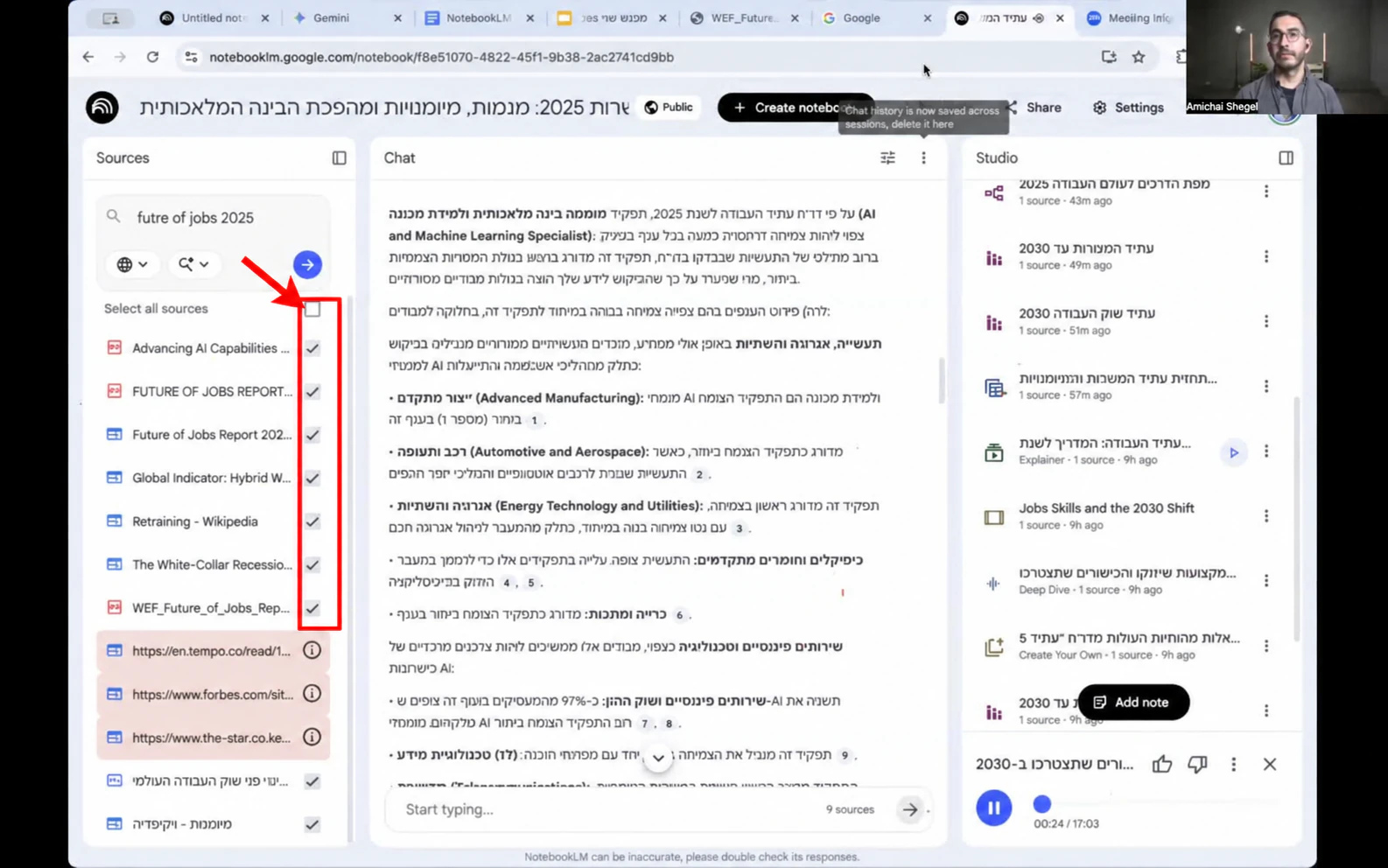
במפגש הוזן דוח Future of Jobs של הפורום הכלכלי העולמי, והודגמו סיכום, סקירת אודיו ותוצרים חזותיים. זהו שחזור של דרך העבודה, ולא פלט חדש שנוצר ואומת בתוך חשבון שלכם.
מקור: דוח Future of Jobs Report 2025, מהקישור הרשמי שבסוף המדריך. הוראות: השתמשו בפרומפט הסיכום ובקשו להתמקד בשינויי מיומנויות. תוצר יעד: עמוד אחד עם מגמה, הראיה בדוח והשלכה אפשרית לעסק. בדיקה: פתחו בדוח את ההפניה לכל מגמה, והפרידו בין תחזית גלובלית לבין מסקנה מקומית שלכם.
דוגמת ניסוח לתוצר, ללא המצאת נתון: ״הדוח מתאר שינוי במיומנויות הנדרשות. לפני החלטה על הכשרה לצוות, נבדוק אילו משימות שלנו קשורות למגמה ובאיזה קטע בדוח היא מוסברת.״ הוסיפו מספרים רק אחרי שמצאתם ואימתם אותם במקור.
יוצרים פודקאסט בעברית
- מסמנים את המקורות שצריכים להיכלל בפודקאסט. לשיחה ממוקדת בוחרים מסמך אחד או נושא מוגדר.
- ב-Studio בוחרים Audio Overview ופותחים את אפשרויות ההתאמה.
- בוחרים עברית ומגדירים למי מיועדת הסקירה. אפשר לבחור פורמט מבין האפשרויות הזמינות, למשל שיחה מעמיקה או תקציר.
- מזינים את הנחיית המיקוד הבאה ומפעילים יצירה. מחכים לסיום לפני הורדה או שיתוף.
- מאזינים לתוצאה, במיוחד לשמות, מספרים ומסקנות. מתקנים את ההנחיה ויוצרים מחדש אם נפלה טעות. קובץ אודיו נעים להאזנה עדיין דורש בדיקה.
מיקוד סקירת האודיו
צרו סקירת אודיו בעברית לבעלי עסקים שאינם מכירים את המסמך. התמקדו בשלוש מסקנות מעשיות מתוך המקורות שנבחרו. הסבירו כל מונח מקצועי במשפט קצר. הפרידו בין תחזית, עובדה והמלצה. אל תוסיפו מספרים או דוגמאות שלא נמצאים במקורות.הדביקו בכלי המתואר במדריך. מלאו את הפרטים שבסוגריים ובדקו את התוצאה מול המקור.
מה עוד יוצרים ב-Studio
אפשר להפיק דוחות, מפות חשיבה, כרטיסיות, שאלונים, טבלאות נתונים, מצגות, אינפוגרפיקות וסקירות וידאו, בהתאם לזמינות ולמכסות בחשבון. בחרו תוצר לפי המשימה: דוח לפגישה, כרטיסיות ללמידה או מצגת להסבר לצוות. עברו על עברית, יישור לימין, גרפים ונתונים לפני שימוש.
בסקירת האודיו תמיכה בעברית אינה אומרת שכל אפשרות זמינה בעברית: לפי התיעוד, ההשתתפות הקולית האינטראקטיבית זמינה באנגלית בלבד. גם שליטה מסוימת באורך תלויה בשפה. אל תבנו תרגיל בעברית שמחייב את האפשרויות האלה.
מהסיכום לעבודה בצוות
מפת חשיבה ופתק · מתמקדים בחלק אחד
במפגש הודגם בחירת ענף במפת חשיבה, שמירת תשובה עם Save to note והפיכתה למקור עם Convert to source. אפשר להשתמש בדרך הזאת כדי להכין חומר ממוקד לנושא קטן מתוך דוח גדול.
לפני שהופכים פתק למקור בודקים אותו מול המסמך המקורי. אחרת טעות בסיכום יכולה להפוך לבסיס לתוצר הבא. שמרו בשם הפתק את מקורו, ובמידת האפשר השאירו גם את המסמך המקורי מסומן. שמירת פתק שימושית לארגון חומר; אין צורך להסתמך על הטענה הישנה שהצ׳אט בהכרח נמחק בכל יציאה.
בדיקת סיכום לפני שמירה
בדוק את הסיכום שכתבת מול המקורות שנבחרו. החזר טבלה עם: הטענה, ההפניה שתומכת בה, האם יש הסתייגות במקור, וניסוח מתוקן אם צריך. סמן במפורש כל טענה שלא מצאת לה תמיכה. אל תהפוך פרשנות לעובדה.הדביקו בכלי המתואר במדריך. מלאו את הפרטים שבסוגריים ובדקו את התוצאה מול המקור.
חינם או בתשלום · מה ההבדל המעשי
בטבלת Google שנבדקה ב-14 בספטמבר 2026 המסלול הבסיסי כולל 100 מחברות, עד 50 מקורות במחברת, 50 פניות צ׳אט ביום ו-3 סקירות אודיו ביום. מכסת Deep Research הבסיסית היא 10 בחודש, ולא ביום.
מסלולי Google AI בתשלום ומסלולי Workspace זכאים מציעים מכסות גבוהות יותר ותכונות נוספות בהתאם למסלול. לדוגמה, עמודת Pro מציגה 300 מקורות במחברת ו-20 סקירות אודיו ביום. מכסות עשויות להשתנות; בדקו את הטבלה הרשמית ואת תג המסלול בחשבון לפני רכישה. אין צורך לשדרג כדי לבצע את התרגיל הראשון במדריך.
לא כל תוצר זמין באותה מכסה, ושדרוג אינו מבטל שגיאות. בחשבון ארגוני בדקו מדיניות העלאת מסמכים ושיתוף. אין להעלות חומר לקוח חסוי רק משום שהקובץ נמצא אצלכם במחשב.
שאלות נפוצות
הפודקאסט יצא באנגלית. מה עושים?
בחרו עברית ב-Output Language וגם בהגדרות יצירת האודיו, ואז צרו תוצר חדש. שינוי ההגדרה אינו מתרגם בהכרח קובץ אודיו שכבר נוצר.
הקובץ עלה אבל התשובה לא מתייחסת אליו. למה?
בדקו שהמקור סיים להיטען ושהוא מסומן. פתחו אותו וחפשו משפט מוכר. אם אין טקסט קריא, הכינו גרסה נגישה יותר והעלו אותה שוב.
הגעתי למכסה. חייבים לשלם?
אפשר להמתין לאיפוס לפי סוג המכסה או להשוות מסלול מתאים. בדקו אם המגבלה יומית או חודשית; פתיחת מחברת נוספת לא בהכרח עוקפת מכסה של החשבון.
האם כל תשובה נשענת בהכרח על מקור?
לא. ההפניות עוזרות לבדוק, אך התשובה יכולה לכלול טעויות או פרשנות לא מבוססת. אל תעתיקו נתון למסמך עסקי לפני בדיקתו במקור.
אפשר להכין חומר ללימודים או לסכם פגישה?
כן, על בסיס מסמך או הקלטה שמותר לכם להעלות. אפשר להפיק שאלון או סיכום, ולבדוק שהמונחים, המשימות ושמות הדוברים נקלטו נכון.
אפשר לשלב מחברות עם Gemini?
Google מתעדת שימוש במחברות גם ב-Gemini, בכפוף לזמינות בחשבון. אופן העיגון למקורות עשוי להשתנות בין המוצרים, ולכן בדקו מחדש את התשובה ולא רק את שם המחברת.
אפשר לערוך או להשתמש מסחרית בתוצרים?
האפשרויות שונות בין סוגי תוצר ומסלולים. בדקו את כלי העריכה הזמינים ואת תנאי השימוש, לצד הזכויות שלכם בחומר המקור. יצירת תוצר אינה מעניקה זכויות בתוכן של אחרים.